Participant
July 12, 2017
Answered

Problème création de flèches - Ai

  • July 12, 2017
  • 1 reply
  • 995 views

Bonjour,

Je souhaite créer un modèle de flèche qui serait enregistré dans le menu "Contour" : pour ce faire, j'ai suivi les indications du site d'aide Adobe qui indique :

" Pour définir des flèches personnalisées, ouvrez le fichier Arrowheads.ai enregistré sous ShowPackageContent\Required\Resources\<langue>\ (Mac OS) et sous \Support Files\Required\Resources\<langue>\ (Windows). Suivez les instructions contenues dans le
fichier pour créer des flèches personnalisées.

Placez le fichier Arrowheads.ai mis à jour sous : <Illustrator home>\Plug-ins\ et évitez de remplacer le fichier Arrowheads.ai
existant."

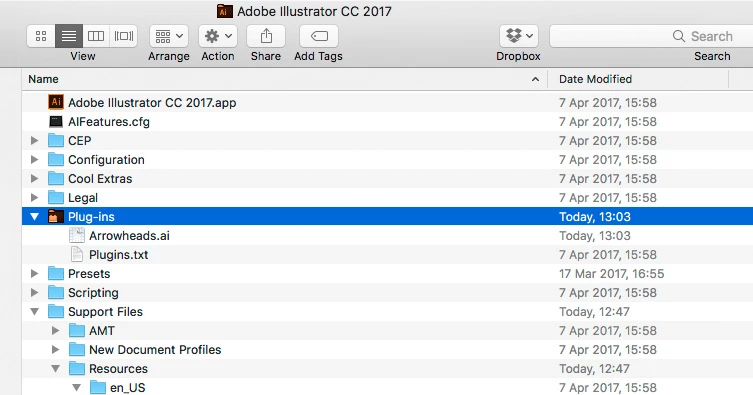
J'ai suivi les instructions, mais je n'arrive pas à trouver le dossier "Plug-ins" :
    This topic has been closed for replies.
    Correct answer c.pfaffenbichler

    Hello

    I want to create a model of arrow that would be saved in the menu "Contour": to do this, I followed the directions of the Adobe help site that indicates:

    " To define custom arrows, open the saved Arrowheads.ai file under ShowPackageContent\Required\Resources\ < language >- (Mac OS) and under \Support Files\Required\Resources\ < language >- (Windows)." Follow the instructions contained in the
    file to create custom arrows.

    Place the updated Arrowheads.ai file under: < Illustrator home > \Plug-ins\ and do not replace the file Arrowheads.ai
    existing."

    I followed the instructions, but I can't seem to find the "Plug-ins" folder:

    This one?

    1 reply

    c.pfaffenbichler
    Community Expert
    c.pfaffenbichlerCommunity ExpertCorrect answer
    Community Expert
    July 12, 2017

    Hello

    I want to create a model of arrow that would be saved in the menu "Contour": to do this, I followed the directions of the Adobe help site that indicates:

    " To define custom arrows, open the saved Arrowheads.ai file under ShowPackageContent\Required\Resources\ < language >- (Mac OS) and under \Support Files\Required\Resources\ < language >- (Windows)." Follow the instructions contained in the
    file to create custom arrows.

    Place the updated Arrowheads.ai file under: < Illustrator home > \Plug-ins\ and do not replace the file Arrowheads.ai
    existing."

    I followed the instructions, but I can't seem to find the "Plug-ins" folder:

    This one?