


Participating Frequently
September 10, 2022
Answered

problème export pdf Illustrator

  • September 10, 2022
  • 3 replies
  • 4045 views

Bonjour, 

J'ai besoin d'aide svp...

J'ai deux problemes lors de l'enregistrements de mes fichiers en pdf !


1 / Lorsque j'enregistre mon plan de travail format A4 en PDF, j'obtiens une image de 4,43 × 5,3 cm

Je ne comprends pas pourquoi.. 
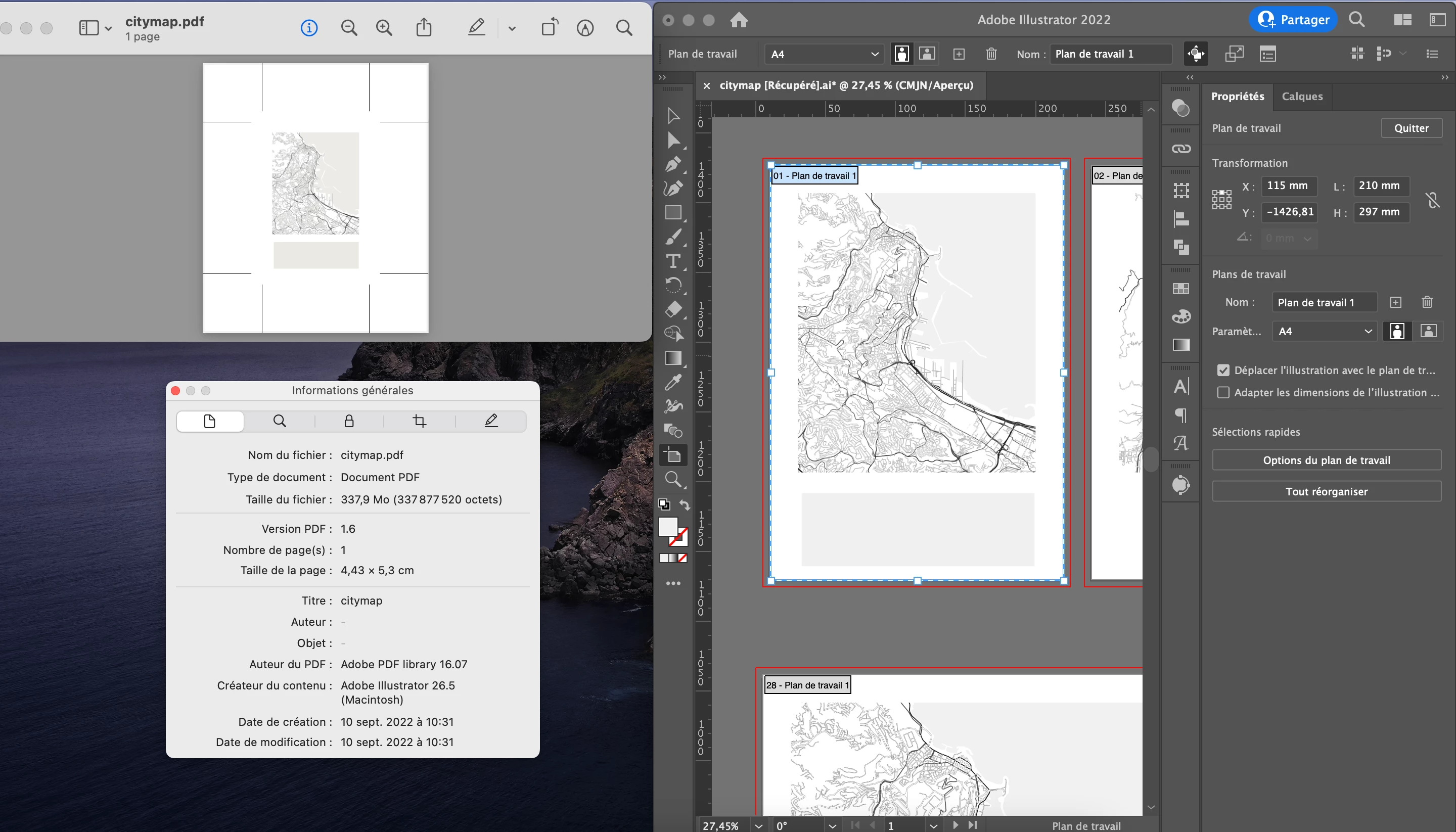
 

2/ J'aimerais exporter plusieurs plans de travail en PDF distinct, j'ai trouvé un sujet ici avec le même problème qui s'est réglé en décochant l'option " conserver les fonctions d'édition d'illustrator " mais pour moi ça ne fonctionne pas, j'obtiens toujours un seul PDF qui contient tous mes plans de travail 


This topic has been closed for replies.
Correct answer Ton Frederiks

For you second problem, you need to create a PDF Preset without Illustrator Editing Capabilities.

Choose Edit > Adobe PDF Presets… select an existing preset and click the + to create a new preset based on this one.

Give it a name such as Export single pages Preset.

Uncheck: Preserve Illustrator Editing Capabilities (you only want to export a single artboard instead of keeping all of them in each file).

For Marks and Bleeds:

Marks: Check Trim Marks


Go to File > Export > Export for Screens

Select Artboards > All

Select PDF as export format

Click the cog wheel  for Advanced Export Settings, choose PDF, select your Export single pages Preset and click Save Settings.

Now you can Export your Artboards as single PDF pages

3 replies

Ton Frederiks
Community Expert
Ton FrederiksCommunity ExpertCorrect answer
Community Expert
September 11, 2022

For you second problem, you need to create a PDF Preset without Illustrator Editing Capabilities.

Choose Edit > Adobe PDF Presets… select an existing preset and click the + to create a new preset based on this one.

Give it a name such as Export single pages Preset.

Uncheck: Preserve Illustrator Editing Capabilities (you only want to export a single artboard instead of keeping all of them in each file).

For Marks and Bleeds:

Marks: Check Trim Marks


Go to File > Export > Export for Screens

Select Artboards > All

Select PDF as export format

Click the cog wheel  for Advanced Export Settings, choose PDF, select your Export single pages Preset and click Save Settings.

Now you can Export your Artboards as single PDF pages

kahina_ckAuthor
Participating Frequently
September 29, 2022

2ème probleme réglé 😁

Super... Merciiiiii beaucoup ! 

Ton Frederiks
Community Expert
Community Expert
September 29, 2022

Good to hear that.

Ton Frederiks
Community Expert
Community Expert
September 11, 2022

Looking at the giant crop marks, I believe that you are working in a large canvas document.

Try to create a new A4 sized document an copy/paste your artwork in there.

You cannot change a large canvas document into a normal canvas document, so you need to create a new file and copy paste your artboards.


kahina_ckAuthor
Participating Frequently
September 29, 2022

Merci pour votre réponse, voici le resultat sur un nouveau document :

Les traits de coupe sont normaux... Enfin !

Mais il y a toujours ce probleme de résolution 

Anna Lander
Inspiring
September 29, 2022

votre carte est-elle vectorielle ou raster?
si raster, quelle est la taille et la résolution d'origine?

Anna Lander
Inspiring
September 11, 2022

please show the Marks & Bleed option the Save PDF window and the Print Setup window. It looks like you have some issues there.

kahina_ckAuthor
Participating Frequently
September 29, 2022

Merci pour votre réponse, je ne suis pas sûre d'avoir capturé les bons renseignements mais avec "google traduction" c'est difficile de comprendre...