
Problems assigning colours to bitmaps in Illustrator
Hi, hope someone here can help with this issue I'm having with Illustrator. Using version 24.1 on a MacBook Pro running 10.14.6 (Mojave).
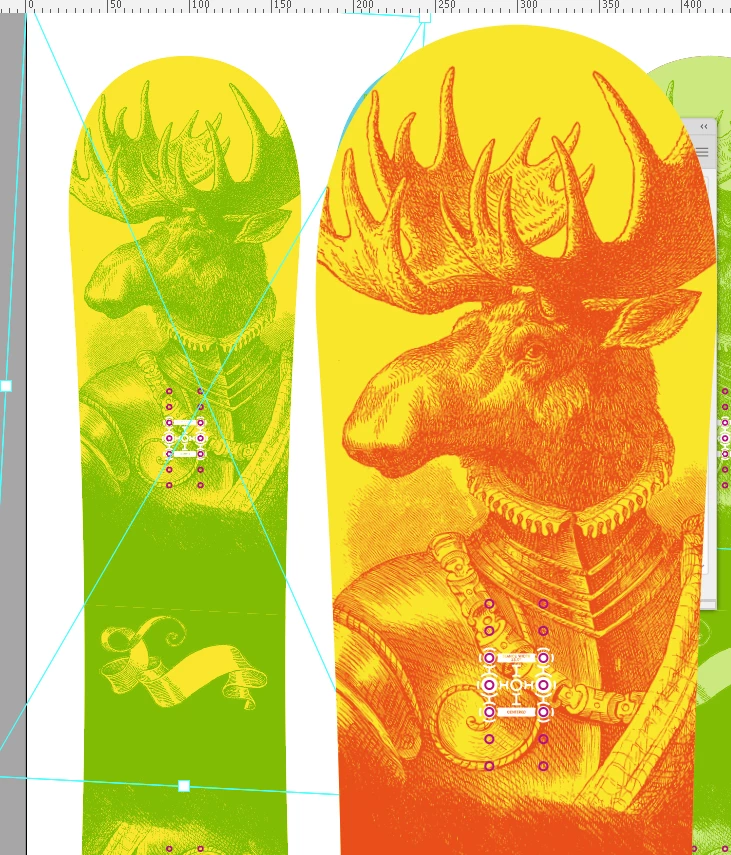
Essentially I'm importing bitmap (.bmp) images created in Photoshop into Illustrator and colour them there. Added two images – the first shows Illustrator not correctly displaying the colour assigned (the problem), however when I pasted the design into Photoshop as a smart object it displays correctly (see V2 image)!
Have tried saving as both Windows and OS2 .bmp files. Using spot and process colours, nothing seems to work. Occassionally the images display corretcly, however when I close the file and reopen they display incorrectly.
So the upshot is I'm working blind at the minute working via a Photoshoip smart object which gets opened in Illustrator recoloured/resaved and then updated in Photoshop so I can actually see how it really looks.
Any ideas how to solve this one?
Regards
Phil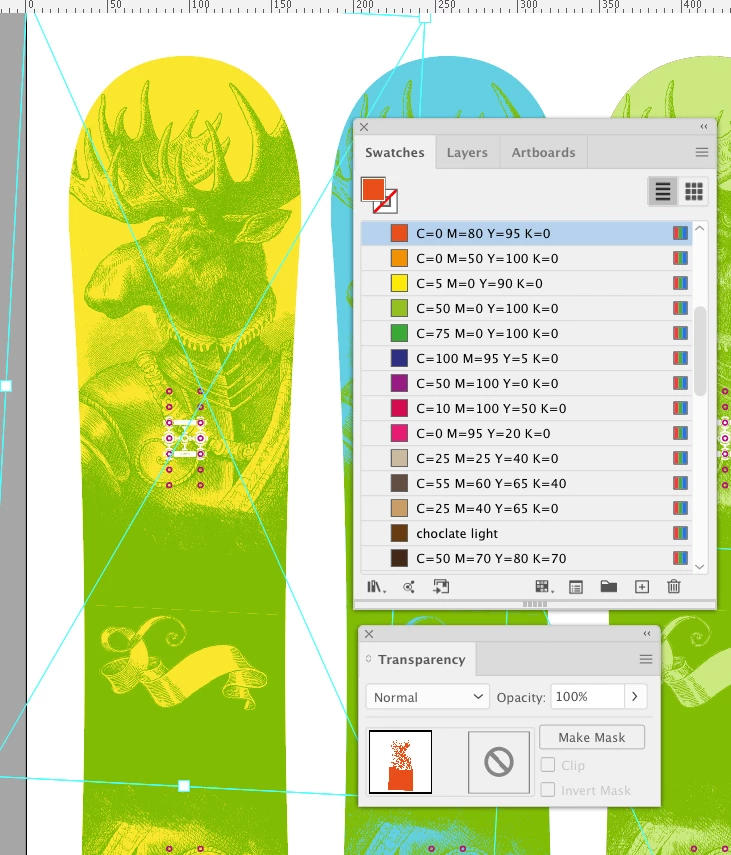
 AdChoices