Participating Frequently
February 22, 2013
Answered

Problems getting started using Variables & Datasets

  • February 22, 2013
  • 2 replies
  • 3596 views

Hello,

I am new to this forum and new to scripting in Illustrator and scripting in general.

I have an XML file containing a number of datasets each consisting of a number of text variables which I want to use to create a deck of trading cards.

Each trading card consists of a Text Field for the title of the card and a number of icons, which are instances of various Symbols

I have written a script to create each card and i can load the variables into my javascript using: newCard.importVariables(new File(xmlPath));

I now need to access the data in the datasets in order to populate the card.

To provide some context, this is an image of one of the cards with placeholder art:
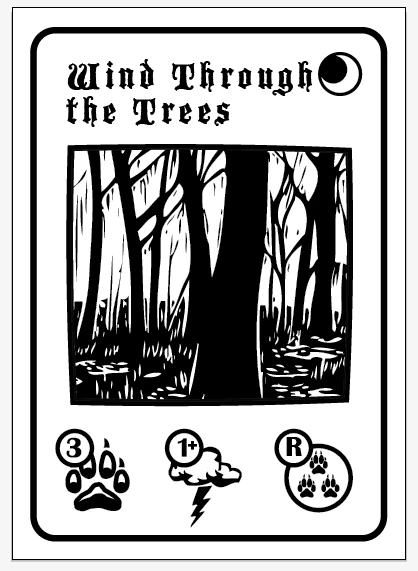
Currently, for the icon in the top right hand corner (the PHASE icon) I am using the following code:

phase = "night";

phaseIcon = newCard.symbols.getByName(phase);

phaseIcon1 = newCard.symbolItems.add(phaseIcon);

phaseIcon1.top = 232;

phaseIcon1.left = 140;

What i want to be able to do, is to pull the value for the <phase></phase> TextVariable from my XML dataset and insert that into the script, but I don't know how. This is where I am stuck as to how to proceed. Any help is greatly appreciated.

Thanks,

Nick

This topic has been closed for replies.
Correct answer CarlosCanto

So, this is what i have now managed to get working at the moment:

idoc = app.activeDocument;

var xmlPath = "~/desktop/wolfCardsDeck.txt";   // This is my datasheet formatted with XML tags but saved in plain txt format

var myXmlFile = new File(xmlPath);

var xmlFileValue = myXmlFile.open("r");

var myXmlString = myXmlFile.read();

var stringContents = myXmlString.toString();

var wolfCardsXML = new XML (stringContents); // This line converts the info from the txt file to readable XML data

var currentCard = wolfCardsXML.card[0];

var phaseValue = currentCard.phase.toString();

var phaseIcon = idoc.symbols.getByName(phaseValue); // This finds the icon that corresponds to the phase variable in the XML

var phaseIcon1 = idoc.symbolItems.add(phaseIcon);

I am not sure if this repeats the functionality of AI's variables/datasets methods but it does now seem to be a workaround that does what i want it to do. I can use this now as a framework to build a set of functions that will loop through the dataset and pull the different variables directly. Am I missing something obvious?


ok, then you only needed the datasets to be able to get the string data, right? this proved to be not as easy as it seemed

-----------------

then to get the string data you used the xml file instead, your last sample looks fine, I was making the same thing while you posted your sample, I used the xml file though

var xmlfile = File.openDialog("Select a valid XML file","XML:*.xml", false);

if(xmlfile != null) {

    xmlfile.open("r");

    var xmlstring = xmlfile.read();

    xmlfile.close();

    xmlfile = null;

} else {

alert("Error opening XML file.");

}

var wolfCardsXML = new XML (xmlstring);

var currentCard = wolfCardsXML.card[0];

var phaseValue = currentCard.phase.toString();

alert(phaseValue);

2 replies

pixxxelschubser
Community Expert
Community Expert
February 23, 2013

Sorry for OT

You really want to use Illustrator and create a script?

Have you considered other options into consideration - eg the data merge in InDesign?

CarlosCanto
Community Expert
Community Expert
February 23, 2013

you have to get that info from the textFrame associated with that variable

var idoc = app.activeDocument;

var ivar = idoc.variables.getByName ('phase');

alert(ivar.pageItems[0].contents);

nick_NYPAuthor
Participating Frequently
February 23, 2013

Carlos,

Thanks for your reply, that makes sense to me and I can get it to work from within an open illustrator document, i.e. i can manually bind a variable to the textFrame and then pull the data as in your script, but how would I go about automating this from within the script?

I can create a new textFrame using:

var iTextBox = idoc.textFrames.add();

but i can't associate it with the variable.

Thanks for your help,

Nick

Inspiring
February 23, 2013

For me Adobe has provided variable data in it's apps for those who want some automation but don't script… I see little point in scripting this feature… Just MO of cause but if you are going to write javaScript then just do it all with this…? JavaScript to me is far easier to learn than that xml that AI seems to be sooooo bloody fussy over… Why not just CSV like PS… At leats that I can understand…