Participant
August 25, 2017
Answered

Problems with Illustrator after Windows 10

  • August 25, 2017
  • 2 replies
  • 616 views

Hello, I am having troubles with fonts on illustrator. When I try expanding them the resolution begins to deform. This happended a few months after I installed Windows 10. I updated my drives but still keep having the same problem. Here are some screen captures of the problem:
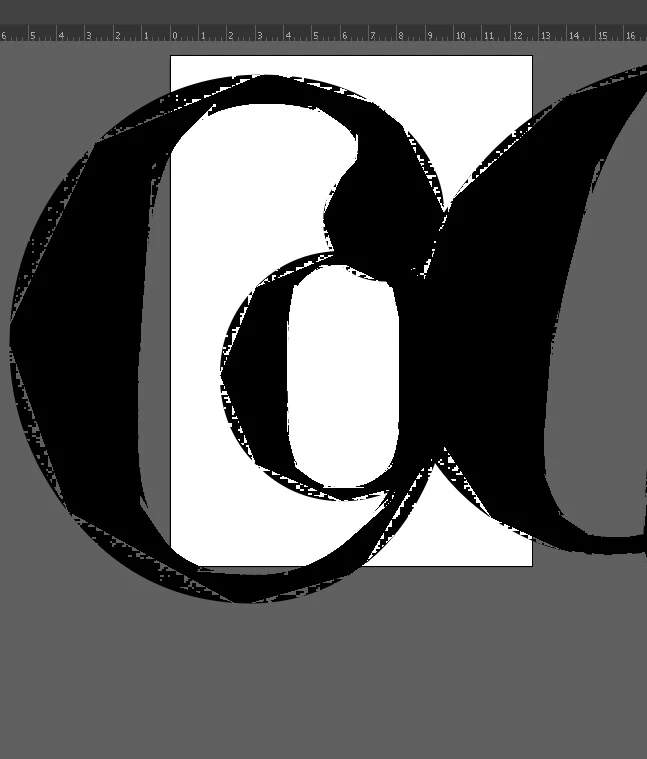
This happens whit ALL of the fonts I use. Please help!!!

I have an HP Pavillion, with an Intel Graphics HD 520.

This topic has been closed for replies.
Correct answer Monika Gause

Try View > Preview on CPU

There are updates for graphic cards drivers available that might solve this.

2 replies

Jacob Bugge
Community Expert
Community Expert
August 25, 2017

ailenn,

This GPU issue should be fixed by Intel in their latest driver update (15.46.02.4729 - released on 11 JUL 2017 ) available at - https://downloadcenter.intel.com/download/26941/Graphics-Intel-Graphics-Driver-for-Windows -15-46-?product=88358

This update cannot show up driver search, as it might take some time for Microsoft to get it integrated in their Surface Pro driver updates. Microsoft prevents installing driver directly from Intel if you try the installer directly, however latest driver from Intel can be installed with steps listed in section "Update video adapter device drivers" > "Intel (Surface Pro devices)" in below link

https://helpx.adobe.com/illustrator/kb/illustrator-gpu-performance-driver-update.html

First reported by Rama in post #5 here (I think):

https://forums.adobe.com/thread/2361553

Monika Gause
Community Expert
Monika GauseCommunity ExpertCorrect answer
Community Expert
August 25, 2017

Try View > Preview on CPU

There are updates for graphic cards drivers available that might solve this.