

sam.t
Participating Frequently
August 8, 2022
Answered

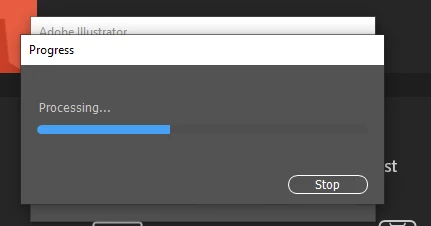
Progress Bar "Processing" Keeps Popping Up in Illustrator v26.4.1

  • August 8, 2022
  • 18 replies
  • 12204 views

I keep getting this "Progress" bar upon opening Illustrator and it prevents me from doing anything. I've tried uninstalling and re-installing the application, restarting etc.. nothing seems to get rid of it! It's happening on my work computer that's running Windows 10 Enterprise. 


I hope something can be done as I primarly use Illustrator for my projects!


Thanks so much,


Sam 


Correct answer Anshul_Saini

Hi @sam.t @dianae63580053 @MrBill812 @David Greusel 


We are sorry for the trouble. This has been reported on multiple posts by many users. We have logged a bug with the product team and will like to investigate the issue further. Would you mind sharing a few details like:


In the meantime, you may roll back and install the older v26.3.1.


Looking forward to your responses.


Thanks & Regards,
Anshul Saini

#Marking it correct to highlight

18 replies

dianae63580053
Participant
August 8, 2022

Yep. I've had the same thing happen and I'm absolutely stuck. Illustrator 2022 has been very unstable and obviously wasn't properly tested or ready for release. Very frustrated and disappointed. I also need it fixed ASAP! 

Participant
August 9, 2022

Thanks for saving my life guys, completely uninstalling 26.4.1 and then roll back to v. 26.3.1 works like a charm!

Participant
August 9, 2022

Uninstalling latest version and going back to 26.3.1 seems to have resolved my issue. Thanks, community!

dianae63580053
Participant
August 8, 2022

What is up with Illustrator 2022? I've had more problems with it crashing than I've ever had with any other Adobe product. I'm now dead in the water. I've tried everything from rebooting to reinstalling the app and nothing has worked. No matter what I've tried, it just gets stuck in an endless loop of "processing" after recovering from a crash. Please help! 

MrBill812
Participating Frequently
August 8, 2022

Same thing was happening to me today. Uninstalling & reinstalling did not help (26.4.1).
I had to go back to the previous version (26.3.1).

Participant
August 9, 2022

Me indica como volver a la versipón anterior por favor, gracias

sam.t
sam.tAuthor
Participating Frequently
August 9, 2022

Abra Creative Cloud y haga clic con el botón derecho en la versión de Illustrator que ha instalado; verá una opción para ver "otras versiones". (Perdón por la mala traducción, ¡solo uso el traductor de Google!)

Participating Frequently
August 8, 2022

Hello, 

The recent update (8/9/2022) of Adobe illustartor on Windows 10 keeps crashing immediatly after i attempt to open saved files (newly saved ones as well as one saved prior to the update). I read similar posts before typing mine up. Please fix it.

Participant
August 8, 2022

Since the last update, 3 days ago, when I try to open an AI file, the program starts and crashes immendiately; when I start Illustrator and try to open a file directly from Illustrator, the program crashes after a few minutes, sometime a few seconds...

Sergio James
Inspiring
August 8, 2022

Dear Support community,

I just wanted to let you know that I have been experiencing all day crash after crash with illustrator.  All the others were ok. I tried all: Safe mode, admin mode, reinstall, update drivers and softwares, etc.  Nothing work and the information provided here was not clear. Then I runned my old CS6 and it was running very smoothly so I realize that perhaps the solution is to install a prevous version.  So far, it's working. So I believe that the latest version has a glitch that need to be addressed.  I lost a whole day and I'm sure Abobe will not refund this time from the mony I monthly pay to receive from Adobe a good service.

I  am sharing my solution thinking that perhaps there are others like me, lost.

Sergio

Participant
August 8, 2022

Hola, el dia de hoy quise abrir el Illustrator para continuar con un trabajo que ya habia empezado hacer.. pero inesperadamente se cierra. No tengo actualizaciones pendientes, ya reinicie varias veces la computadora y no puedo ni crear un archivo nuevo  ni abrir uno porque lo cierra sin darme la oportunidad de trabajar algo.

Participant
August 8, 2022

This exact thing. Just started happening today. Couple of uninstall/reinstall cycles have not helped solve the problem.

Help!

sam.t
sam.tAuthor
Participating Frequently
August 8, 2022

Glad to know I'm not the only one! Wild that it just started for you today too... hopefully someone will know 😕😕