PromptToSaveChanges / ScriptUI Default Highlighted Button
Hi!
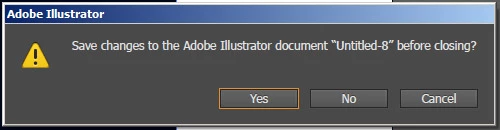
For some reason when I try to close a document using SaveActions.PROMPTTOSAVECHANGES, the prompt never appears and it autosaves and closes. As a workaround, I've just built my own dialog using ScriptUI, but for some reason I can't figure out how to set the OK button to be highlighted by default like the AI prompt.
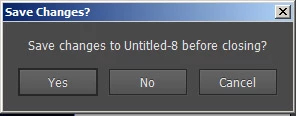
var dlg = new Window('dialog', 'Save Changes?');
dlg.orientation = 'column';
dlg.add( 'staticText', undefined, 'Save changes to ' + doc.name + ' before closing?' );
var btnGrp = dlg.add( 'group' );
var yes = btnGrp.add( 'button', undefined, 'Yes' );
var no = btnGrp.add( 'button', undefined, 'No' );
btnGrp.add( 'button', undefined, 'Cancel' );
dlg.defaultElement = yes;
dlg.show;
If you have could point me in the right direction in either, I'd really appreciate it! Thanks!

 AdChoices