This topic has been closed for replies.
Correct answer Katie Houghton

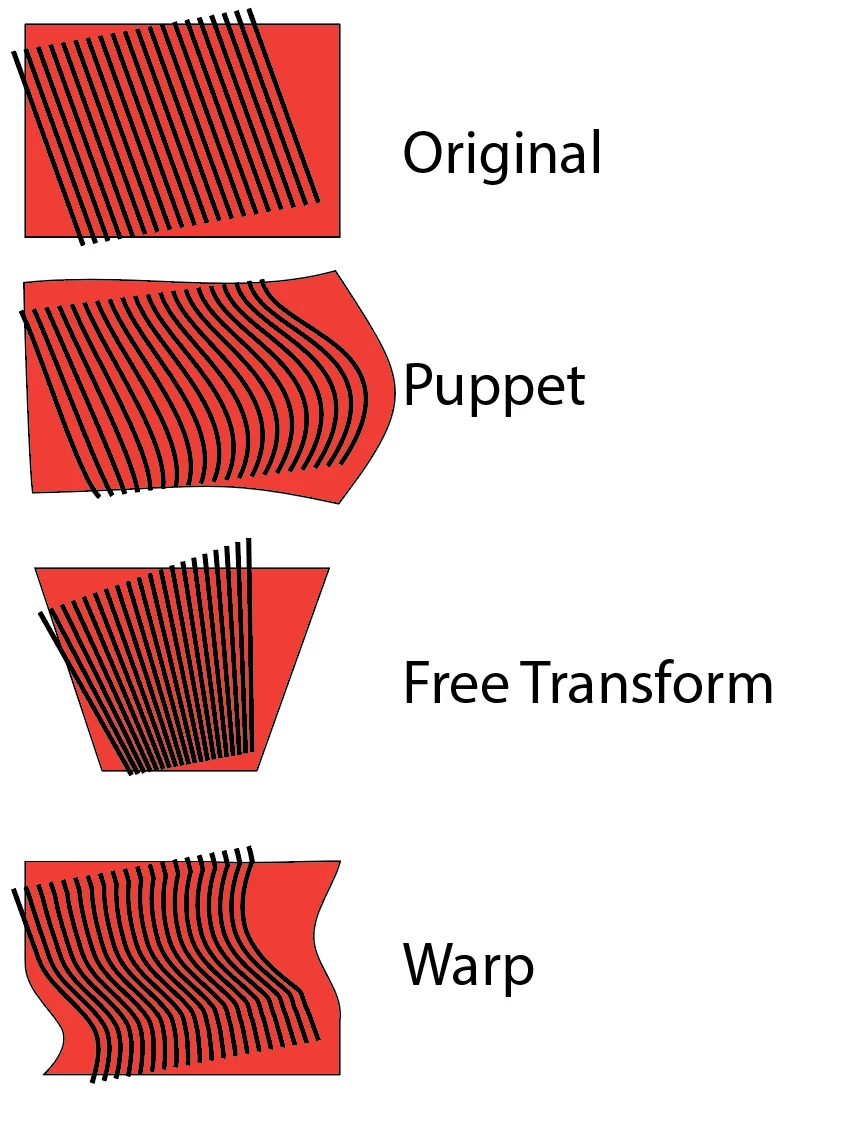
The puppet is treating each element as a separate element where in Photoshop it is one object. Illustrator will keep breaking them up but if you make the lines with the blend tool and keep the solid object behind it and blend it all at once the blend will keep it as one element. I think a compound shape should have worked too since that is one object but it still breaks up. Here is a sample of a blend object on top of a rectangle. I used many warps. Works great.
4 replies

July 11, 2019

I tried to duplicate your problem but everything worked ok. Maybe the Illustrator preferences have been messed up somehow. You could try shutting down Illustrator, deleting the Illustrator preference file in the library and then restart Illustrator. Then try the puppet warp on your objects.

Katie HoughtonCorrect answer
Inspiring
July 11, 2019

The puppet is treating each element as a separate element where in Photoshop it is one object. Illustrator will keep breaking them up but if you make the lines with the blend tool and keep the solid object behind it and blend it all at once the blend will keep it as one element. I think a compound shape should have worked too since that is one object but it still breaks up. Here is a sample of a blend object on top of a rectangle. I used many warps. Works great.

July 11, 2019

Katie.... Excellent post and descriptions. 

barbara_a7746676
Community Expert
Community Expert
July 11, 2019

Are you working with lines that are strokes or are they filled closed shapes? Are they grouped? How was the illustration constructed?

Inspiring
July 11, 2019

Simple stroke paths for the lines.

Simple rectangle shape for squareé

July 11, 2019

Is it possible that your line segments have a fill applied to them and not just a stroke? It looked like they have a white fill which shows when the line segments are curved. Try making sure fill is set to none and try the puppet  warp again.

Inspiring
July 11, 2019
July 11, 2019

Well offhand the only other thought is to convert the lines to outlines and then apply warp.
