Answered
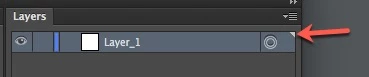
Purpose of small white triangle at top-right corner of a layer (in layers panel)?
As the topic name imples:
I'm using Illustrator CS6.
Thanks
As the topic name imples:
I'm using Illustrator CS6.
Thanks
It's just an indicator that tells you that the highlighted item in the palette is a main layer or a sublayer. It can be helpful if you are working with nested layers that contains a lot of sublayers and groups because groups are not marked with the triangle.
It's not necessary to click on the triangle to select all objects on a layer. You can just click somewhere in the right column of the layer item.
Already have an account? Login
Enter your E-mail address. We'll send you an e-mail with instructions to reset your password.
 AdChoices