Inspiring
December 24, 2023
Answered

[Q] Using $.getenv

  • December 24, 2023
  • 1 reply
  • 613 views

I was trying to use $.getenv on MacOS but it returns 'undefined'. Am I misunderstanding how to use it?

var envname;

$.getenv(envname);
$.writeln(envname);

 

This topic has been closed for replies.
Correct answer m1b

Hi @tomd75724979, I've never actually used it, but I had a quick look and here's what I noticed:


First, see this note in the docs specifically for MacOS:
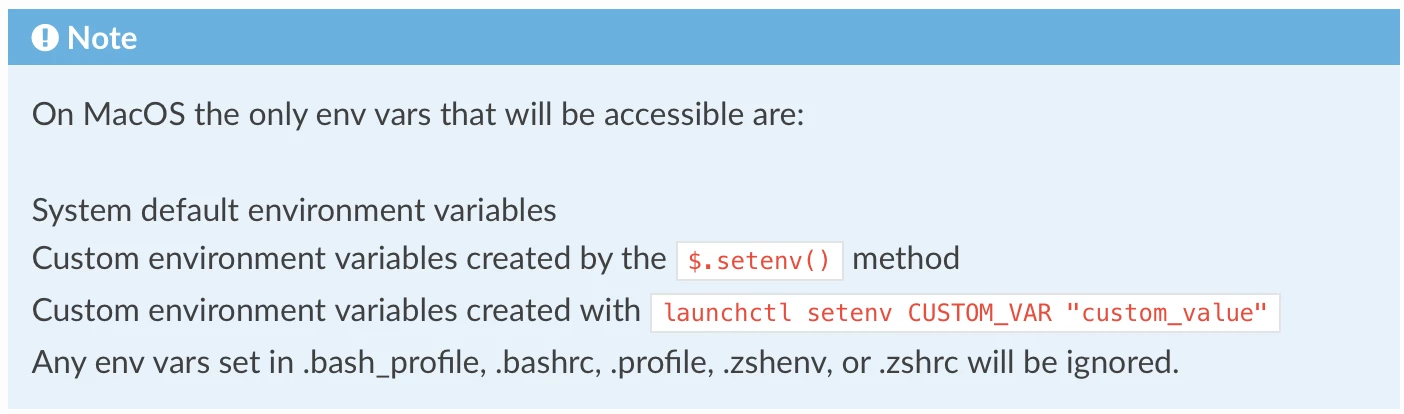
So it claims to use launchctl setenv. So you can do this:


1. In a terminal session, type this:


launchctl setenv "foo" "bar"


2. launch Illustrator (the var won't be available to Illustrator unless it launches after step 1).

3. run this ExtendScript


// read "foo" key, alerts "bar"
alert($.getenv('foo');


Note: these vars are not persisent across system restarts.


Also note that you can do it all from in ExtendScript itself:

// write
$.setenv('foo','baz');

// read
$.writeln($.getenv('foo'));

and this var will persist as long as Illustrator is open. However, I don't think you will be able to read a var set in ExtendScript from outside, eg. by launchctl getenv "foo" because environment vars set this way seem to be passed from parent process to child, so don't go back up and to another process, eg. a terminal.


That's all I could tell at a quick look. Hopefully there are some experts on here that may shed more light.

- Mark

1 reply

m1b
Community Expert
m1bCommunity ExpertCorrect answer
Community Expert
December 24, 2023

Hi @tomd75724979, I've never actually used it, but I had a quick look and here's what I noticed:


First, see this note in the docs specifically for MacOS:

So it claims to use launchctl setenv. So you can do this:


1. In a terminal session, type this:


launchctl setenv "foo" "bar"


2. launch Illustrator (the var won't be available to Illustrator unless it launches after step 1).

3. run this ExtendScript


// read "foo" key, alerts "bar"
alert($.getenv('foo');


Note: these vars are not persisent across system restarts.


Also note that you can do it all from in ExtendScript itself:

// write
$.setenv('foo','baz');

// read
$.writeln($.getenv('foo'));

and this var will persist as long as Illustrator is open. However, I don't think you will be able to read a var set in ExtendScript from outside, eg. by launchctl getenv "foo" because environment vars set this way seem to be passed from parent process to child, so don't go back up and to another process, eg. a terminal.


That's all I could tell at a quick look. Hopefully there are some experts on here that may shed more light.

- Mark

Inspiring
December 25, 2023

Hi Mark,


Many thanks for your response. I now realise I completely misunderstood this. I thought this would return the machine environment, something like {Apple Macintosh, 14.0} or {Microsoft Windows, 10.x}. But I now understand that it is some overarching variable that can be accessed from multiple scripts.

CarlosCanto
Community Expert
Community Expert
December 25, 2023

for the os you can use the following. But I'm on Windows 11, so I'm not sure what the 10.0 is

$.os
// Result: Windows/64 10.0