jenniferp56247351
Known Participant
Feb 12, 2025 4:11 PM UTC
Answered

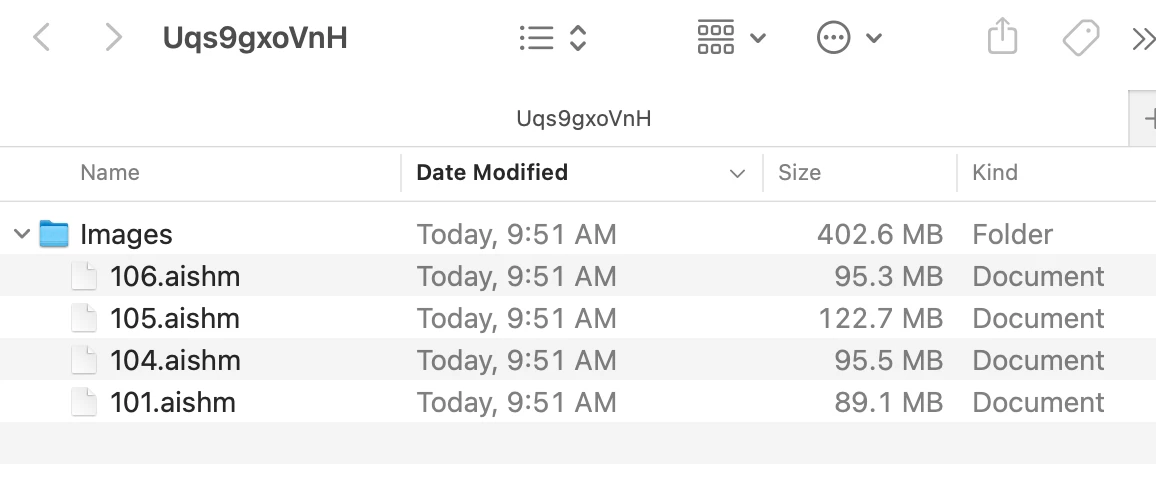
Random folders with jumbled letters that appear on desktop

When saving files in Illustrator I'm getting random folders with jumbled letters that appear on my desktop with ".aishm"  What is this and how can it be stopped?
 

Anubhav M
Anubhav MCorrect answer
Community Manager
Feb 12, 2025 8:06 PM UTC

Hello @jenniferp56247351,

Would you mind checking if you're saving to a removable/network drive or a cloud-synced folder using iCloud/Google Drive/etc? If yes, try saving your files to local directory and running Illustrator under Safe Mode (Windows / macOS) to see if it helps.

Also, try disabling the following settings in Illustrator and share your observations:


Looking forward to hearing from you.


Anubhav

4 replies

Participant
Apr 24, 2026 8:43 AM UTC

The fix for this is in a broken image. Can you fix/replace it please? without it, this article provides no answers

Translate
Anubhav M
Community Manager
Anubhav MCommunity ManagerCorrect answer
Community Manager
Feb 12, 2025 8:06 PM UTC

Hello @jenniferp56247351,

Would you mind checking if you're saving to a removable/network drive or a cloud-synced folder using iCloud/Google Drive/etc? If yes, try saving your files to local directory and running Illustrator under Safe Mode (Windows / macOS) to see if it helps.

Also, try disabling the following settings in Illustrator and share your observations:


Looking forward to hearing from you.


Anubhav

Translate
jenniferp56247351
Known Participant
Feb 13, 2025 2:58 PM UTC

Thanks Anubhav,

Disabling the settings helped.

Jennifer

Translate