Participant
August 15, 2017
Answered

Randomize text in a brush kind of way like photoshop

  • August 15, 2017
  • 3 replies
  • 5236 views

Hello!

I have a few hashtag texts that I want to come out all randomized and rotated in different ways like if you would use a brush in photoshop. Is there any way to do this in illustrator?

Also if there is any way to do this with pictures as well.

If not, how do I do it in Photoshop or another adobe program?

Thanks!
This topic has been closed for replies.
Correct answer Ton Frederiks

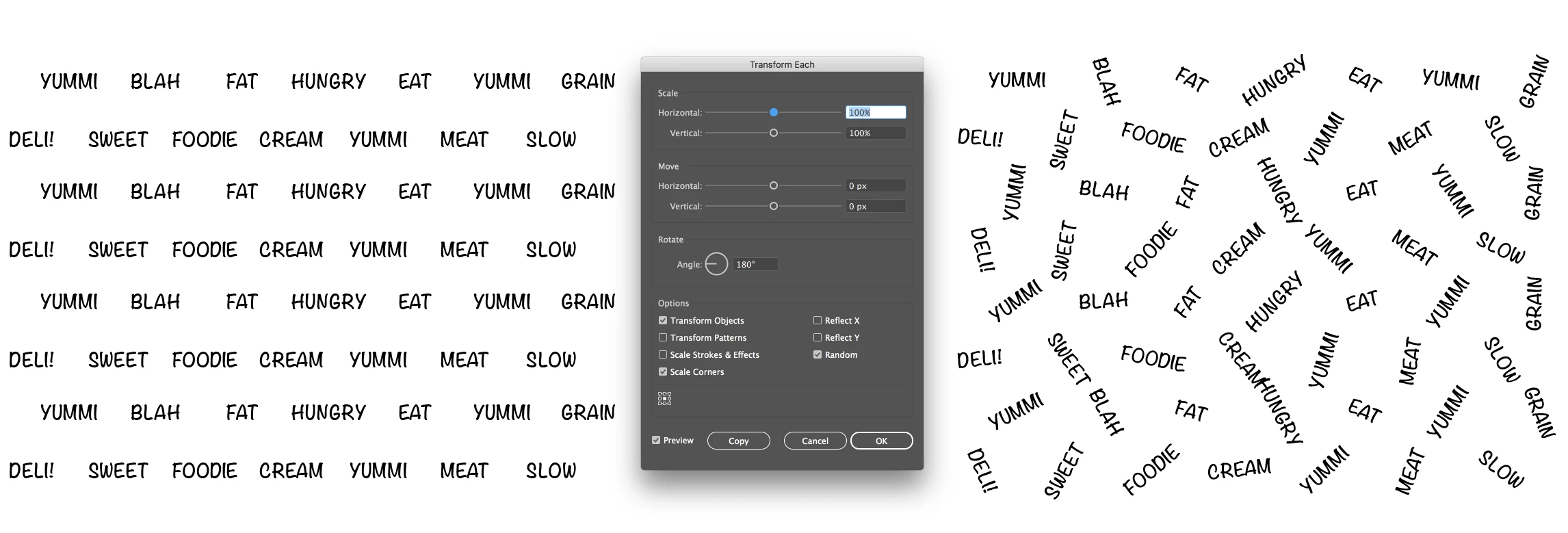
Maybe you can do it with Object > Transform > Transform Each

Choose the Random option and Rotate.

3 replies

Participating Frequently
August 15, 2017

This is exactly what the Space Fill function in the plug-in ColliderScribe is for. You select a container object and some filling objects and choose Object > Space Fill > Make. Then you can adjust the sizing, rotation, regularity, etc of the objects.

Ton Frederiks
Community Expert
Ton FrederiksCommunity ExpertCorrect answer
Community Expert
August 15, 2017

Maybe you can do it with Object > Transform > Transform Each

Choose the Random option and Rotate.

Mr_IKEAAuthor
Participant
August 15, 2017

Hmm this is actually a great fix to this particular project. Thanks! Thank you both for your answers <3

Ton Frederiks
Community Expert
Community Expert
August 15, 2017

Good to hear that worked for you.

Monika Gause
Community Expert
Community Expert
August 15, 2017

Do you mind if they overlap?

In that case you could use a scatter brush.

Can you post a sample image?

For Wordclouds there are a couple of websites that generates those.

Mr_IKEAAuthor
Participant
August 15, 2017

I was thinking something like this. I'm making a design for a product and was just thinking if there's a simpler way to do this than to rotate them myself and scatter them myself. They can't overlap since it wouldn't look good on a product.

Monika Gause
Community Expert
Community Expert
August 15, 2017

When they can't overlap, you will have to do it manually.

Even with Photoshop's brushes, overlapping is possible.

What you are looking for is a nesting algorithm with added randomizing and visual appealing design. I'm not sure if this even exists outside of Illustrator. And if so, it would be rather expensive.