
Inspiring
November 24, 2019
Answered

Re: arrow key issues

  • November 24, 2019
  • 3 replies
  • 2098 views

AUG 2020 : I have had this problem since latest update- and it's getting really difficult to work around. I Cant use arrow keys to nudge, OR shift-arrows for nudge by 10 x

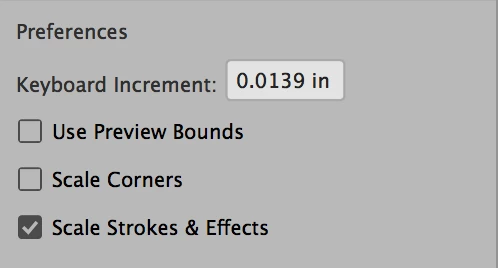
this response above, to re-set the increments is not working. I set it to the 0.0139 in/ or, 1.0008px which is an annoying amount. but no go. I've tried re-starting multiple times. super problematic!
    This topic has been closed for replies.
    Correct answer jane-e

    Hi

    I read your post here:

    https://community.adobe.com/t5/illustrator/arrow-key-issues/m-p/10760486

    I agree with Ton that your keyboard increment is too small and you need to change it. Right now it is .00002 inches. The default is .0139 inches, or 1 pt.


    Your arrows will work with a tiny increment if you hold them down for a long time. Adding Shift will increase the distance by 10.

    .

    There are several places you can change it.

    1. Mac: Application menu > Preferences > General
    2. Win: Edit menu > Preferences > General
    3. Properties panel (if nothing is selected)


    Jane


    3 replies

    Participating Frequently
    December 6, 2021

    I am having the same issue, my nudge keys do not nudge, they send a selected point WAY far instead of a small point nudge.

    Very frustrating. I use these nudge keys all the time.

    Ton Frederiks
    Community Expert
    Community Expert
    December 6, 2021

    What is the setting in the preferences?

    Participating Frequently
    December 6, 2021

    Where do I check the arrow up down preferences?

    trying to find it, no luck yet

    jane-e
    Community Expert
    Community Expert
    August 25, 2020


    Hi


    For testing purposes, set it to something really high, like 1 inch. If it still does not work, go to Preferences > General > Reset Preferences, then Quit and Relaunch.


    Also, I will move this from the Photoshop forum to the Illustrator forum. The OP asked about Illustrator and Photoshop does not have the same controls. Which application are you using?


    ~ Jane


    Inspiring
    November 24, 2019

    Apologies to post this hear, I am having issues with being able to use my arrow keys in Illustartor. I asked in the Illustrator forum and felt like I was being trolled with no real answer, so Im asking here in hopes that someone with intelligence and common sense has a decent answer for me. I am having issues with being able to use my up, down, left and right arrow keys in moving objects in increments in that it is not working at all. Im having to manually use my mouse to move objects slowly in increments. If there is anyone that can help me with this issue, that would be REALLY awesome. Thanks.

    If this helps, I am using the current Illustrator 24.0.1 software and running it on Windows10.

    jane-e
    Community Expert
    jane-eCommunity ExpertCorrect answer
    Community Expert
    November 25, 2019

    Hi

    I read your post here:

    https://community.adobe.com/t5/illustrator/arrow-key-issues/m-p/10760486

    I agree with Ton that your keyboard increment is too small and you need to change it. Right now it is .00002 inches. The default is .0139 inches, or 1 pt.


    Your arrows will work with a tiny increment if you hold them down for a long time. Adding Shift will increase the distance by 10.

    .

    There are several places you can change it.

    1. Mac: Application menu > Preferences > General
    2. Win: Edit menu > Preferences > General
    3. Properties panel (if nothing is selected)


    Jane