Participant
June 15, 2020
Answered

Re: help with fitting a photo to a shape

  • June 15, 2020
  • 1 reply
  • 598 views

Hi, i was wondering if anyone new how to fit a photo to a shape? Many thanks, Rhian

This topic has been closed for replies.
Correct answer John Mensinger

Choose the Direct Select tool (white arrow), and click the anchor point on a corner you want to move.
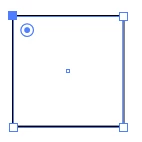
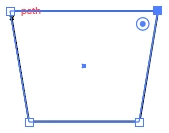
You can drag that corner manually, or use the arrow keys to nudge it in any direction. Nudge each top corner out the same number of key-taps:
 

1 reply

John Mensinger
Community Expert
Community Expert
June 15, 2020

With the shape and the image on your artboard, position the shape over and in front of the image. Size everything as desired, and with both selected choose Object > Clipping Mask > Make.

Participant
June 15, 2020

Thank you!


Do you know how to change the shape of the square so it looks more like a plant pot? I want to pull the corners out to make a diangle line.


John Mensinger
Community Expert
John MensingerCommunity ExpertCorrect answer
Community Expert
June 15, 2020

Choose the Direct Select tool (white arrow), and click the anchor point on a corner you want to move.

You can drag that corner manually, or use the arrow keys to nudge it in any direction. Nudge each top corner out the same number of key-taps: