Participating Frequently
March 29, 2018
Answered

Reading text from another open document tab/window and placing a grouped object in the current document for Adobe Illustrator

  • March 29, 2018
  • 1 reply
  • 1413 views

Hi,

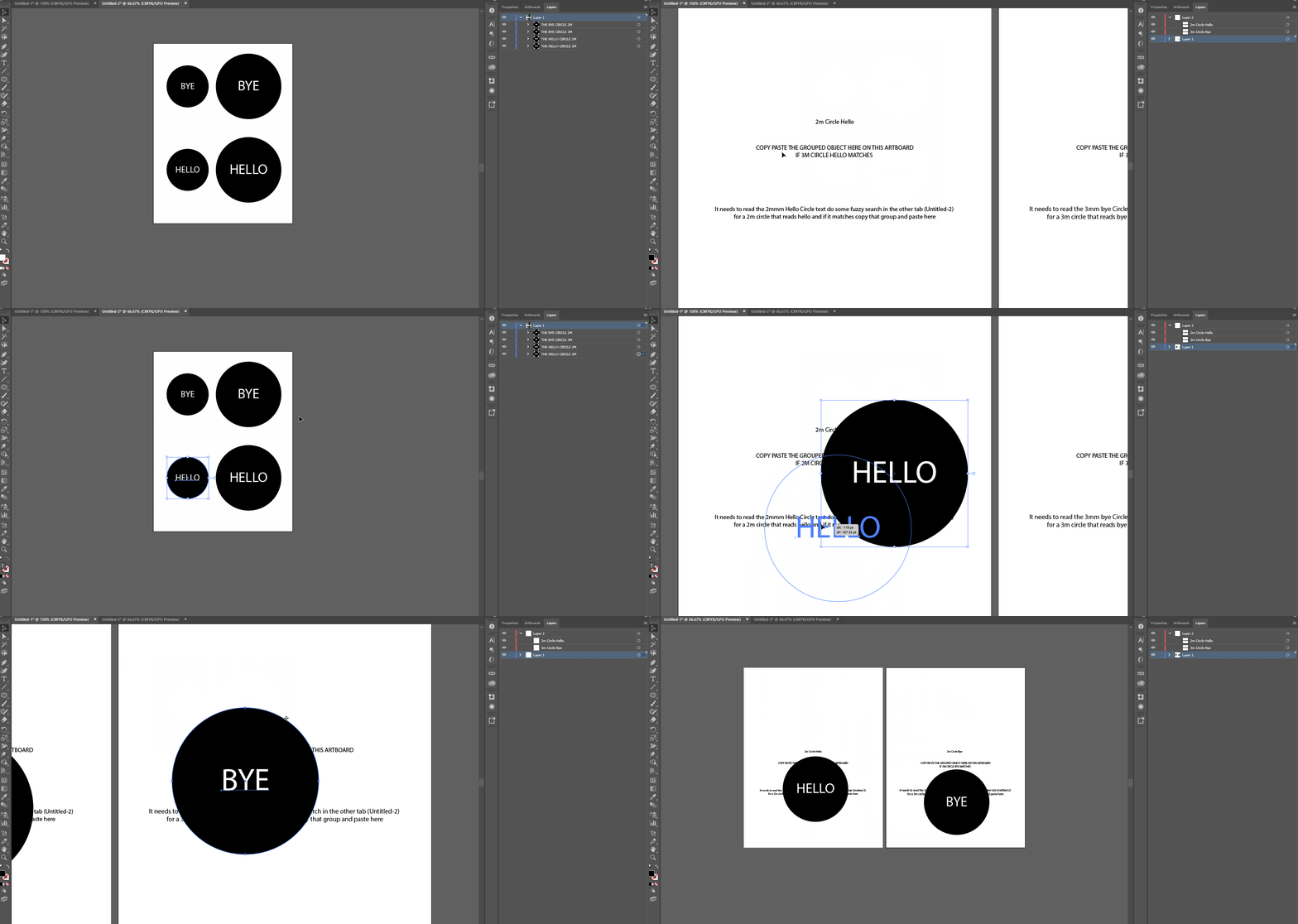
So I would as the title suggest read information from another open document/tab

So if i have art boards with constant similar names it does a close match to an object and if found select copy it and paste on the art board with that name.

I hope this GIF makes sense of what I would like to accomplish. If you cannot see what is happening just right click and open image in new tab

Thank you!

This topic has been closed for replies.
Correct answer Disposition_Dev

Ok, this is a completely do-able task, but step one is to break it down into its constituent components and then figure out how those need to go together. Perhaps start by making yourself a flow chart so you can determine what components you'll need, then we can tackle those one at a time.

For example, one of the components you might need is a function to determine whether a given textFrame (the text inside your circle) matches the name of a given artboard.

function frameTextMatchesArtboard(text,artboardName)

{

     //return a boolean value representing whether the given text matches the given artboard name

     return text === artboardName;

}

then elsewhere in the script you would use that function to determine whether to duplicate your object into the other document, like so:

//using somewhat silly variable names so it's very clear what i'm talking about

var arrayOfCircleObjects = [];

//do something to populate the above array, a simple loop with the array.push() method would work great.

var arrayOfDestinationArtboards = [];

//again, populate this array with a loop in the same manner

//now depending upon the number of objects and artboards you're working with, you'll nest one loop inside another to compare the text to the artboard names. the number of objects determines which loop will be nested inside the other.

var currentCircleObject, currentCircleText;

var currentArtboard;

for(var x=0, len = arrayOfCircleObjects.length; x < len; x++)

{

     currentCircleObject = arrayOfCircleObjects;

     //here you'll need to do something to get the contents of the textFrame contained within this object

     currentCircleText = getCircleText(currentCircleObject);


     //now loop the artboards from the other document

     for(var y=0, yLen = arrayOfDestinationArtboards.length; y < len; y++)

     {

          currentArtboard = arrayOfDestinationArtboards;

          if(frameTextMatchesArtboard(currentCircleText, currentArtboard.name)

          {

               //duplicate the circle object to the other document

          }

     }

}

I know this isn't the complete answer you were looking for, but i believe there's tremendous value in being able to work through the problems on your own.

If you have any specific questions on how this stuff works or how to do something, i'm here. Hopefully the above examples help put you on the right track.
1 reply

Disposition_Dev
Disposition_DevCorrect answer
Legend
March 29, 2018

Ok, this is a completely do-able task, but step one is to break it down into its constituent components and then figure out how those need to go together. Perhaps start by making yourself a flow chart so you can determine what components you'll need, then we can tackle those one at a time.

For example, one of the components you might need is a function to determine whether a given textFrame (the text inside your circle) matches the name of a given artboard.

function frameTextMatchesArtboard(text,artboardName)

{

     //return a boolean value representing whether the given text matches the given artboard name

     return text === artboardName;

}

then elsewhere in the script you would use that function to determine whether to duplicate your object into the other document, like so:

//using somewhat silly variable names so it's very clear what i'm talking about

var arrayOfCircleObjects = [];

//do something to populate the above array, a simple loop with the array.push() method would work great.

var arrayOfDestinationArtboards = [];

//again, populate this array with a loop in the same manner

//now depending upon the number of objects and artboards you're working with, you'll nest one loop inside another to compare the text to the artboard names. the number of objects determines which loop will be nested inside the other.

var currentCircleObject, currentCircleText;

var currentArtboard;

for(var x=0, len = arrayOfCircleObjects.length; x < len; x++)

{

     currentCircleObject = arrayOfCircleObjects;

     //here you'll need to do something to get the contents of the textFrame contained within this object

     currentCircleText = getCircleText(currentCircleObject);


     //now loop the artboards from the other document

     for(var y=0, yLen = arrayOfDestinationArtboards.length; y < len; y++)

     {

          currentArtboard = arrayOfDestinationArtboards;

          if(frameTextMatchesArtboard(currentCircleText, currentArtboard.name)

          {

               //duplicate the circle object to the other document

          }

     }

}

I know this isn't the complete answer you were looking for, but i believe there's tremendous value in being able to work through the problems on your own.

If you have any specific questions on how this stuff works or how to do something, i'm here. Hopefully the above examples help put you on the right track.

NoobletAuthor
Participating Frequently
March 30, 2018

Thank you for that deep explanation will play around and update this thread when needed!

NoobletAuthor
Participating Frequently
May 21, 2018

Alright so I have this working for the most part thanks to the ScriptUI PDF documentation.

however it only works in the dialogue window, the minute i make it the palette window so that I can always keep it active and add if needed it throws an error at the bottom

// This works well to search but have to be on window and would need to keep launching the script

var w = new Window ('dialog {text: "Linked objects script", alignChildren: "fill"}');

// This would be better since i can work and have it active at all times but it throws and error on the code below it

var w = new Window ('palette {text: "Quick select", alignChildren: "fill"}');

null is not an object on the loop section here (var i = 0; i < list.selection.length; i++)

if (w.show () != 2){

var selected = [];

    for (var i = 0; i < list.selection.length; i++){

         selected.push (list.selection.text);

        }

return selected;

}

Full code is below of what does work and video demonstration.

#target illustrator

#targetengine main

var docRef = app.documents.getByName("LinkedItems.ai"); // Get the LinkedItems open document tab

var layers = docRef.layers;                             // Get all the layers in the LinkedItems document

var myLayer = layers["Layer 1"];                        // Select Layer 1 to refer to our LinkedObjects

var typeArr=[];

var  SavedSelection = [];

for ( i=0; i < myLayer.groupItems.length; i++){

        if (myLayer.groupItems.name != ''){

            typeArr.push(myLayer.groupItems.name);

        }

    }

picked = type_ahead(typeArr);

function type_ahead (linkedItems) {

var selected, temp;

var w = new Window ('dialog {text: "Linked objects script", alignChildren: "fill"}');

//var w = new Window ('palette {text: "Quick select", alignChildren: "fill"}');

var entry = w.add ('edittext {active: true}');

var list = w.add ('listbox', [0,0,200,450], linkedItems, {multiselect: true});

var addItem = w.add("button", undefined,"Add selected items to current document");

entry.onChanging = function (){

    temp = this.text;

    var selected = [];

    list.selection = null;

    for (var i = 0; i < linkedItems.length; i++){

        if (linkedItems.toLowerCase().indexOf (temp) > -1){

             selected.push(i);

        }

    }

    list.selection = selected;

}

function saveSelected(){

        for (var i = 0; i < list.selection.length; i++) {

             SavedSelection.push (list.selection.name);

             var SelectedGroup = SavedSelection;

             var currentGroup = myLayer.groupItems[list.selection];

             currentGroup.selected = true;

             // Duplicates our selected matched items into the activeDocument

             var dupItem = currentGroup.duplicate(app.activeDocument,ElementPlacement.PLACEATEND);

        }


}

addItem.onClick = saveSelected;

if (w.show () != 2){

var selected = [];

    for (var i = 0; i < list.selection.length; i++){

         selected.push (list.selection.text);

        }

return selected;

}

} // End of type ahead function and menu

Video of the dialogue part working as you can see I cannot click or do anything on the artboard until i close the script.