
Known Participant
May 17, 2022
Answered

Rearranging paths in Layers Panel when there are lots of them?

  • May 17, 2022
  • 2 replies
  • 545 views

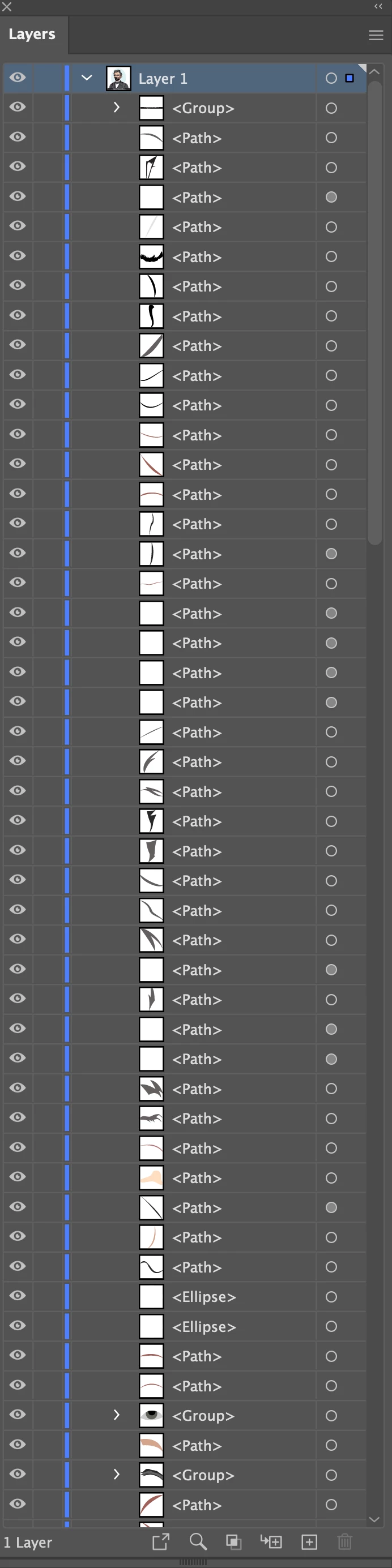
When working with lots of paths such as can be seen in the screenshot:

1. Is there an easy way to drag an object/path to the very bottom of the Layer? When doing so, I have to drag through the long scrolling list of objects and it is not easy.

Thanks


1. 
This topic has been closed for replies.
Correct answer Doug A Roberts

1. The object will move to the bottom of the current layer, not the entire object hierarchy. Is that what you mean?

2. Object > Arrange > Send Backward will move it down one step.

2 replies

Larry G. Schneider
Community Expert
Community Expert
May 17, 2022

Object>Arrange >Send to Back should do what you want.

Doug A Roberts
Community Expert
Community Expert
May 17, 2022

Literally to the bottom? Object > Arrange > Send to back.

media katAuthor
Known Participant
May 17, 2022

1. I just tried that and it worked, though it does not move the path visually to the very bottom of the Layer Panel. Why is that?

2. If I want to move it near the bottom of the stack in the Layer but not to the very bottom, is it just a process of dragging it downward in the Layers Panel or using Object > Arrange > Send Backward


Thanks 

Doug A Roberts
Community Expert
Doug A RobertsCommunity ExpertCorrect answer
Community Expert
May 17, 2022

1. The object will move to the bottom of the current layer, not the entire object hierarchy. Is that what you mean?

2. Object > Arrange > Send Backward will move it down one step.