

Recording Actions for "Offset Path"?
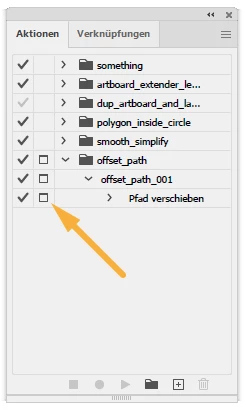
I want to explore using Actions to call up often used commands like Offset Path or Blend > Make that don't have keyboard shortcuts. I know I could use keyboard shortcuts but I don't want to have to memorize new possibly criptic keyboard keys combinations for all the commands I want to use.
I confess I never bothered to consider Scripts in Illustrator, shame on on me, and I have been using Ai since the '90s...
So, my question is "Is there a way to force the script to 'stop' for user input?".
Right now, when I try to record and play the "Offset Path" command, for instance, once I press the PLay button to execute the script, it executes the script using the supplied arguments when the command was recorded: it does not "stop" to allow me to enter new parameters?
 AdChoices