Known Participant
April 23, 2023
Answered

Rectangular grid: how to reset values

  • April 23, 2023
  • 1 reply
  • 546 views

Dear Community,


I noticed that when I change some values for the rectangular grid with the V/F option AND/OR with the ARROWS, then all (new) grids created with the rectangular grid will inherit the last values.

Why so and how can I avoid that?

Also, the Rectangular Grid Tool Options window seems not to work.

Look at the screenshot below: the number of dividers should be 8x8 but the grid shows 6x8 (and I have tried to save several times).
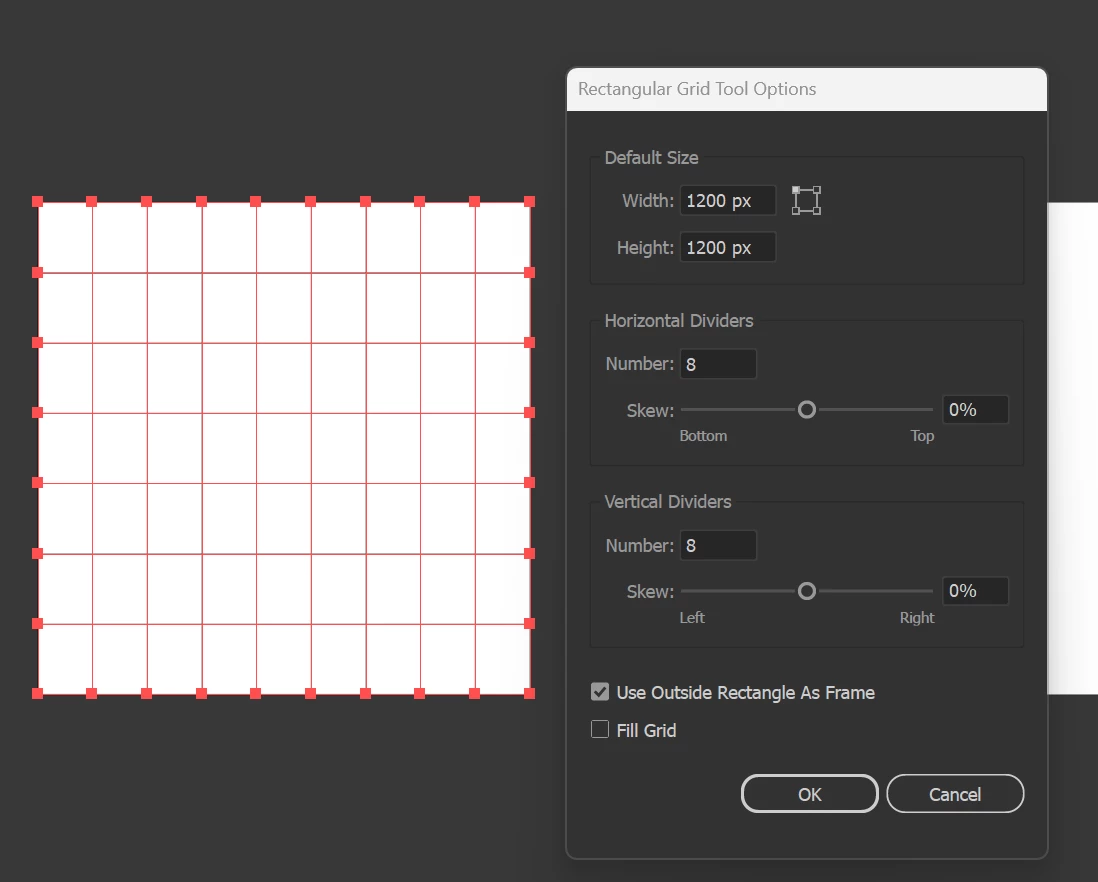
Thanks for your attention 🙂

Alberto

This topic has been closed for replies.
Correct answer Kurt Gold

You cannot avoid it at the moment. If you need the default values again (I think 100 px for width and height and 5 horizontal/vertical dividers) you just have to reenter them in the dialog.


As for your asymmetrical issue I don't know a possible reason. It's not normal behaviour. Perhaps restart Illustrator or your computer and try again.


1 reply

Kurt Gold
Community Expert
Kurt GoldCommunity ExpertCorrect answer
Community Expert
April 24, 2023

You cannot avoid it at the moment. If you need the default values again (I think 100 px for width and height and 5 horizontal/vertical dividers) you just have to reenter them in the dialog.


As for your asymmetrical issue I don't know a possible reason. It's not normal behaviour. Perhaps restart Illustrator or your computer and try again.


Known Participant
April 27, 2023

Ok then, if that's how it has to be, for now... 😞