Inspiring
March 18, 2018
Answered

Reduce an Object Size Multiple Times in one Command

  • March 18, 2018
  • 4 replies
  • 1006 views

Hi

If I have a design and some of the objects within the artwork are multiplied up or down by a ratio of 1.2, is there anyway of multiplying by this ratio more than once in one command?

For instance with the two circles below the small circle as been divided by 1.2 in the transform panel five times to get it to the size it is - is there a way of doing this in one command.  If you simply do 1.2 x 5 = 6 then divide it by 6 in the transform panel, it comes out a completely different size because when you scale down each time you decrease the original circle by 1.2 on a individual basis. It gives you a different (and preferred) result because the circle you are dividing by is a different size after each division by 1.2

This would save me so much time when designing icons etc if it was possible to do this one command?

This topic has been closed for replies.
Correct answer Ray Yorkshire

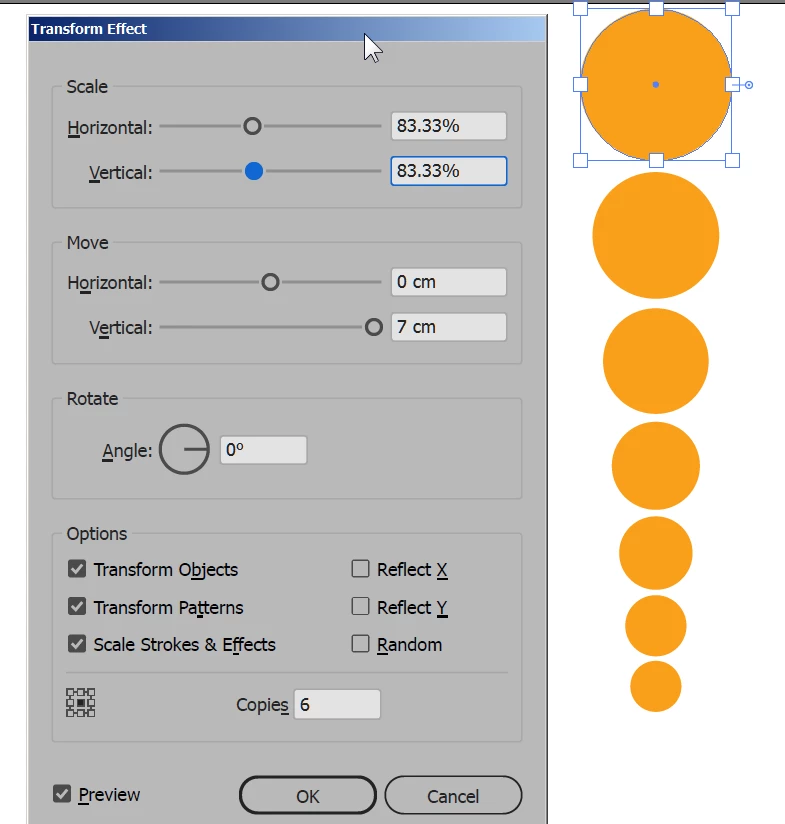
Effect > Distort and Transform >Transform

in the H and V add /1.2

eg 100%/1.2

then copies 6

Object > Expand Appearance

Object >Ungroup

4 replies

CarlosCanto
Community Expert
Community Expert
March 18, 2018

it turns out the reduction factor for 1.2 (5 times) is 40.187%

going up would be 248.837%

Ray Yorkshire
Ray YorkshireCorrect answer
Participating Frequently
March 18, 2018

Effect > Distort and Transform >Transform

in the H and V add /1.2

eg 100%/1.2

then copies 6

Object > Expand Appearance

Object >Ungroup

Larry G. Schneider
Community Expert
Community Expert
March 18, 2018

Great,concise explanation, Ray.

Omar.Fathy
Community Expert
Community Expert
March 18, 2018

You can make calculations in transform commands:

Right Click on the object then choose Transform>Scale:

You can repeat your transform by pressing Ctrl+D  or Transform>Transform again.

March 18, 2018

@ Omar

What is this! My Illustrator doesn't calculate exponents ("power of ..."), only simple math.

Fenja

c.pfaffenbichler
Community Expert
Community Expert
March 18, 2018

I think it should be 1.2 to the power of 5, which is 2,48832.

Inspiring
March 18, 2018

I can't do that math in illustrator directly though can I?

March 18, 2018

Yes, but use the command Object > Transform > Transform each, because the other transform panels don't like math.

For your example use 100/1.2^5 (downsizing) or 100*1.2^5 (upsizing) and press Copy for a new object.

If you also want to get the objects between: 100/1.2  , then press Copy, then press Strg+D for "Transform again".

Fenja