
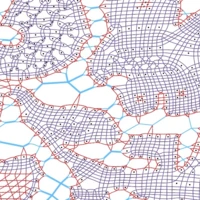
Relative line weight among thin lines look correct on the screen but thin lines are thicker when printed.
I am using line weights 0.25 pt, 0.5 pt, and 0.75 pt, by necessity because of size requirements in the printed output. They appear correctly on the screen in Illustrator, but they are all roughly the same thickness (about 1 pt) when the file is printed directly from Illustrator.
I know it’s not a problem with the printer’s ability to print on uncoated paper because screenshots print with correct line weights down to 0.25 pt, and even finer because I printed the screen shot at a greater reduction than the Illustrator output.
I don’t think it’s a problem with AI’s interface with the printer, because when I print to Adobe PDF instead of directly to the printer, the thin lines are thicker in the screen display of the PDF file as well as in the hardcopy output. I can’t find several of Google’s suggestions (e.g., I can’t even find an “Options” dialog box in which to uncheck “Create PDF Compatible File”). I did change the raster effects settings to “Custom”, 600 dpi, with no effect on AI’s print output to either Adobe PDF or to the printer.
I’m using Adobe Illustrator 2026: version 30.8.2, running on Windows 10 (yeah, I know. Hard to find the time to update the OS...).
Any suggestions would be most welcome!
 AdChoices