
Inspiring
October 18, 2017
Answered

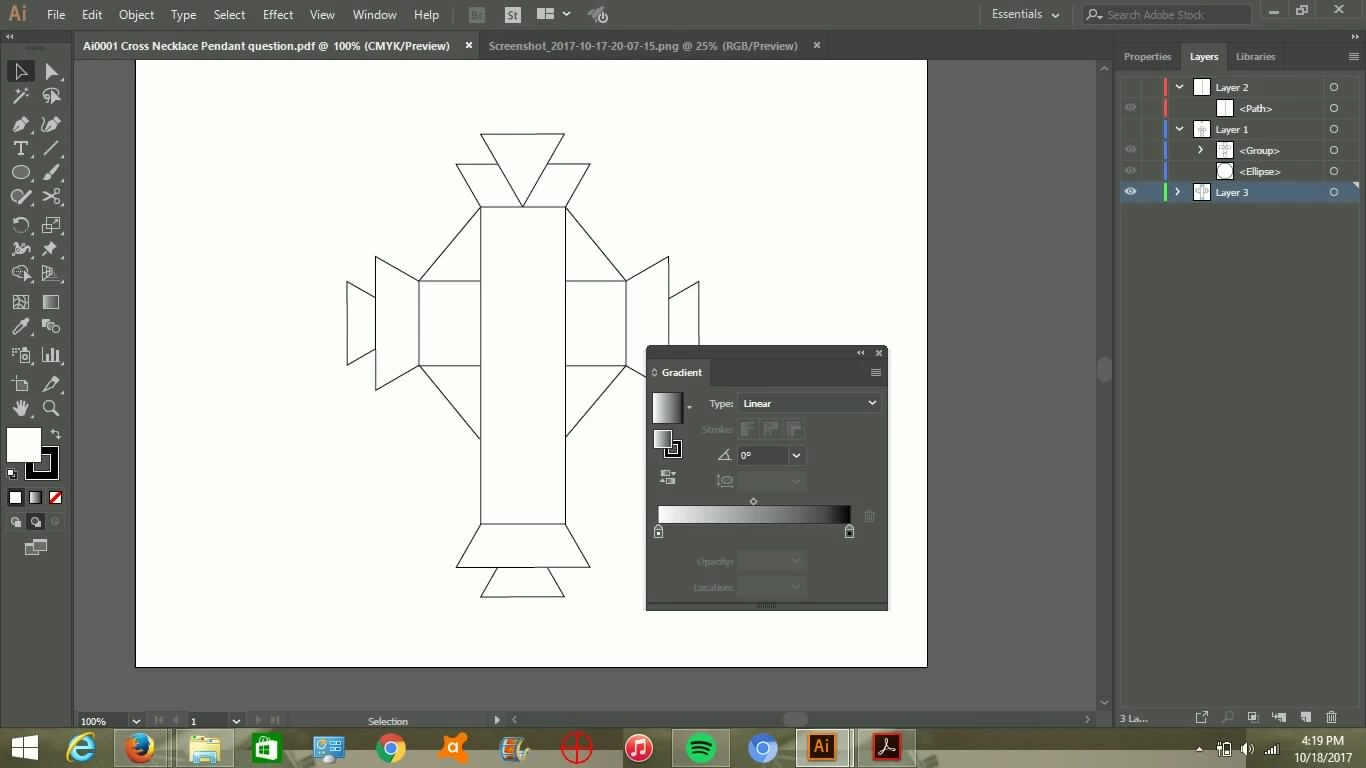
remove all internal lines

  • October 18, 2017
  • 1 reply
  • 3549 views

Hi,

I want to remove all internal lines and make this cross one solid white object with a black outline.  I tried Highlighting / Object / Group and the fill was already set to white but nothing happened. Ignore the gradient window. That's a typo.
    This topic has been closed for replies.
    Correct answer cubsterky

    Please upload your AI files to Dropbox or the like.

    And then post a link here.


    I figured out the problem.  I needed to make the triangles using the polygon tool.  Thanks for your help

    1 reply

    Ray Yorkshire
    Participating Frequently
    October 18, 2017

    Select All

    And use the Shape builder Tool and drag over the shapes you want to combine.

    To combine everything internal use  Window > Pathfinder >Unite

    (the first icon in the Shapes mode)

    cubsterkyAuthor
    Inspiring
    October 20, 2017

    Thank u.

    I did that and now it its still leaving these lines.  I did it twice and that didn't fix it.  What should I do now?

    Monika Gause
    Community Expert
    Community Expert
    October 20, 2017

    You will need to learn how this works.

    Read the documentation

    We need to know what kind of objects these are.

    What exactly did you do? Step by step please.

    Any error messages? Beeping?

    Is this an exact drawing? Perfectly aligned shapes?

    What does the layers panel say about this? A group? What's inside?