

Inspiring
May 9, 2025
Answered

Remove Character "Tag Filters" Permanently

  • May 9, 2025
  • 2 replies
  • 548 views

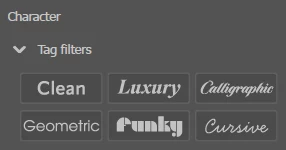
Is there a way for this panel to be permanently collapsed?
 

Correct answer Paulina243255910ko1

I'm using the Essentials Classic workspace as well (with a bit of customization added). I don't have a tag filters thingie popping up above the font name in the Character panel, even when it is displayed in the Properties panel. Have you tried resetting the Character panel? The "reset panel" option is listed at the bottom in the Character Panel flyout menu.


It was still there after resetting and reopening the app. But then I updated from 29.5.1 to 29.5.1 latest update and it disappeared. Yay for now!

2 replies

Community Expert
May 13, 2025

Which Illustrator workspace are you using. When I click the Filter by Classification option in the Character panel I see a flyout menu like what is shown in the attached image:

Inspiring
May 13, 2025

I'm using the Essentials Classic. This appears whenever a piece of text is selected. Here's where:


Community Expert
May 13, 2025

I'm using the Essentials Classic workspace as well (with a bit of customization added). I don't have a tag filters thingie popping up above the font name in the Character panel, even when it is displayed in the Properties panel. Have you tried resetting the Character panel? The "reset panel" option is listed at the bottom in the Character Panel flyout menu.

Participant
May 13, 2025

saving this for an answer because same -- wtf I need to get rid of this
