Participating Frequently
August 1, 2016
Answered

Remove Characters from Filename during File Export

  • August 1, 2016
  • 2 replies
  • 576 views

Hi all,

I have been working with Silly-V​ who has been immensely helpful in creating a script to automate file creation through Illustrator.

What I need some help with now is the ability to add into this script the ability to remove "x #" of characters from a filename during export. This would be ideal as it will totally automate what I have been doing by hand for months.

The current script we have put together takes what generally would take me ~1 minute per file, and has reduced it to 10 seconds. Translate that across the need to process roughly 800-1,000 files, and you can see where the time invested is decreased significantly.

The final piece of the puzzle is the removal of characters from only a ONE of the two files that are created via this script.

First, here is the current script. It seems to be working flawlessly for what I'm asking it to do.

#target illustrator-19 

function test(){ 


  var folder_1 = Folder("~/Desktop/Header CAD"); 

  var folder_2 = Folder("~/Desktop/Clean CAD"); 


  app.userInteractionLevel = UserInteractionLevel.DONTDISPLAYALERTS; 


  function revealAllLayers(doc) {   

      for (var i = doc.layers.length - 1; i >= 0; i--) {   

          doc.layers.visible = true;   

      }   

  };   


  function hideLayer(doc, name) {   

      doc.layers.getByName(name).visible = false;   

  };   


  function exportMyPng(dest, doc, props) {   

      if(props.hasOwnProperty("antiAliasing")){   

        switch(props.antiAliasing){   

          case "ARTOPTIMIZED" : {   

              app.preferences.setIntegerPreference("plugin/PNGFileFormat/AntiAlias", 1);   

              break;     

          }   

          default : {   

              break;   

          }   

        }   

      }   

      var pngOpts = new ImageCaptureOptions();  

      pngOpts.antiAliasing = true;  

      for (var all in props) {   

          if (pngOpts.hasOwnProperty(all) && all != "antiAliasing") {   

              pngOpts[all] = props[all];   

          }   

      }   

      doc.imageCapture(File(dest + "/" + doc.name.replace(/\.\w+$/, props.extraStuff + ".png")), doc.visibleBounds, pngOpts);   

  };   


  var doc = app.activeDocument;   

  revealAllLayers(doc);   

  hideLayer(doc, "Materials");   

  hideLayer(doc, "Detail Artwork");   

  exportMyPng(folder_1, doc, {   

      transparency: false,   

      antiAliasing: "ARTOPTIMIZED",   

      resolution: 300,   

      extraStuff: "_header"

  });   


  hideLayer(doc, "Header");   

  exportMyPng(folder_2, doc, {   

     transparency: false,   

      antiAliasing: "ARTOPTIMIZED",   

      resolution: 300,   

      extraStuff: ""

  });   


  app.activeDocument.close(SaveOptions.DONOTSAVECHANGES); 


};      

test();

test();

I have found that the program Name Mangler​ does an exceptional job of accomplishing the renaming task. Here is a screenshot of what I'm asking for looks like with that program.
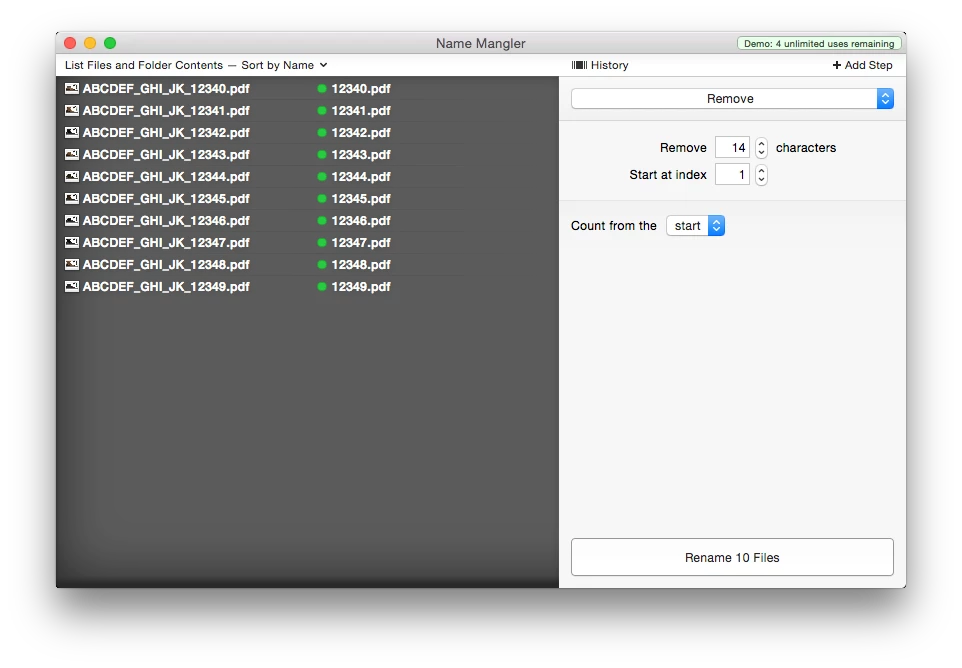
My ultimate goal is to be able to build that single functionality of Name Mangler into the existing script I posted above. Now, the catch is that I ONLY need it to affect the file created by the section of Lines 66-71. As you can see, I need it to remove 14 characters from the filename starting at the index.

Is this possible, and something anyone can help with?

Thank you in advance!

Brooks

This topic has been closed for replies.
Correct answer Silly-V

Whew busy days!

Okay, I got this here:

#target illustrator

function test(){  


  var folder_1 = Folder("~/Desktop/Header CAD");  

  var folder_2 = Folder("~/Desktop/Clean CAD");  


  app.userInteractionLevel = UserInteractionLevel.DONTDISPLAYALERTS;  


  function revealAllLayers(doc) {    

      for (var i = doc.layers.length - 1; i >= 0; i--) {    

          doc.layers.visible = true;    

      }    

  };    


  function hideLayer(doc, name) {    

      doc.layers.getByName(name).visible = false;    

  };    


  function exportMyPng(dest, doc, props) {    

      if(props.hasOwnProperty("antiAliasing")){    

        switch(props.antiAliasing){    

          case "ARTOPTIMIZED" : {    

              app.preferences.setIntegerPreference("plugin/PNGFileFormat/AntiAlias", 1);    

              break;      

          }    

          default : {    

              break;    

          }    

        }    

      }    

      var pngOpts = new ImageCaptureOptions();  

      pngOpts.antiAliasing = true;  

      for (var all in props) {    

          if (pngOpts.hasOwnProperty(all) && all != "antiAliasing") {    

              pngOpts[all] = props[all];    

          }    

      }    

      doc.imageCapture(File(dest + "/" + doc.name.replace(/\.\w+$/, props.extraStuff + ".png").substr(props.charsOffStart)), doc.visibleBounds, pngOpts);    

  };    

  var doc = app.activeDocument;    

  revealAllLayers(doc);    

  hideLayer(doc, "Materials");    

  hideLayer(doc, "Detail Artwork");    

  exportMyPng(folder_1, doc, {    

      transparency: false,    

      antiAliasing: "ARTOPTIMIZED",    

      resolution: 300,    

      extraStuff: "_header",

      charsOffStart: 0

  });    

  hideLayer(doc, "Header");    

  exportMyPng(folder_2, doc, {    

      transparency: false,    

      antiAliasing: "ARTOPTIMIZED",    

      resolution: 300,    

      extraStuff: "",

      charsOffStart: 14

  });        

  app.activeDocument.close(SaveOptions.DONOTSAVECHANGES);  


};      

test();

This one has a new parameter "charsOffStart" that you've got to stick into your two saving-functions, and it will lop off however many starting characters now!

2 replies

bmurfeyAuthor
Participating Frequently
August 2, 2016

I actually just encountered a small hiccup. About 5-10% of our files are still using the old naming convention from before we switched to a new PLM system. What that means is those 5-10% of files have a prefix that is longer than 14 characters. The only constant that will always be the same is that the last 5 characters of the filename are what is needed for that second created file.

Silly-V, via email, clarified that to accomodate that factor, I had to change the code from:

      charsOffStart: 14

to this:

      charsOffStart: -9 

This has solved the file naming on export issue perfectly!

Silly-V
Silly-VCorrect answer
Legend
August 2, 2016

Whew busy days!

Okay, I got this here:

#target illustrator

function test(){  


  var folder_1 = Folder("~/Desktop/Header CAD");  

  var folder_2 = Folder("~/Desktop/Clean CAD");  


  app.userInteractionLevel = UserInteractionLevel.DONTDISPLAYALERTS;  


  function revealAllLayers(doc) {    

      for (var i = doc.layers.length - 1; i >= 0; i--) {    

          doc.layers.visible = true;    

      }    

  };    


  function hideLayer(doc, name) {    

      doc.layers.getByName(name).visible = false;    

  };    


  function exportMyPng(dest, doc, props) {    

      if(props.hasOwnProperty("antiAliasing")){    

        switch(props.antiAliasing){    

          case "ARTOPTIMIZED" : {    

              app.preferences.setIntegerPreference("plugin/PNGFileFormat/AntiAlias", 1);    

              break;      

          }    

          default : {    

              break;    

          }    

        }    

      }    

      var pngOpts = new ImageCaptureOptions();  

      pngOpts.antiAliasing = true;  

      for (var all in props) {    

          if (pngOpts.hasOwnProperty(all) && all != "antiAliasing") {    

              pngOpts[all] = props[all];    

          }    

      }    

      doc.imageCapture(File(dest + "/" + doc.name.replace(/\.\w+$/, props.extraStuff + ".png").substr(props.charsOffStart)), doc.visibleBounds, pngOpts);    

  };    

  var doc = app.activeDocument;    

  revealAllLayers(doc);    

  hideLayer(doc, "Materials");    

  hideLayer(doc, "Detail Artwork");    

  exportMyPng(folder_1, doc, {    

      transparency: false,    

      antiAliasing: "ARTOPTIMIZED",    

      resolution: 300,    

      extraStuff: "_header",

      charsOffStart: 0

  });    

  hideLayer(doc, "Header");    

  exportMyPng(folder_2, doc, {    

      transparency: false,    

      antiAliasing: "ARTOPTIMIZED",    

      resolution: 300,    

      extraStuff: "",

      charsOffStart: 14

  });        

  app.activeDocument.close(SaveOptions.DONOTSAVECHANGES);  


};      

test();

This one has a new parameter "charsOffStart" that you've got to stick into your two saving-functions, and it will lop off however many starting characters now!