
johnu84323189
Participant
May 2, 2024
Answered

Remove or Hide the Show Transformation Values box

  • May 2, 2024
  • 2 replies
  • 387 views

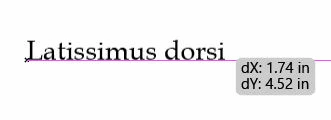
How do I remove (turnoff/hide) the Show Transformation Values box when moving something. I tried going into Edit > Preferences > User Interface. As recommended. The option for Show Transformation Values is not there. 
This topic has been closed for replies.
Correct answer Anubhav M

Hello @johnu84323189,

Thanks for reaching out. Would you mind trying to turn off Measurement Labels under Smart Guides preferences in Illustrator to check if it helps?


Looking forward to hearing from you.


Thanks,

Anubhav

2 replies

Anubhav M
Community Manager
Anubhav MCommunity ManagerCorrect answer
Community Manager
May 2, 2024

Hello @johnu84323189,

Thanks for reaching out. Would you mind trying to turn off Measurement Labels under Smart Guides preferences in Illustrator to check if it helps?


Looking forward to hearing from you.


Thanks,

Anubhav

johnu84323189
Participant
May 2, 2024

Thank you so much. 

Kurt Gold
Community Expert
Community Expert
May 2, 2024

You can turn it off in the Smart Guides section of the application preferences (Measurement Labels).