
Participant
February 29, 2020
Answered

Removing line bits after using image trace and path finder
  • February 29, 2020
  • 1 reply
  • 3829 views

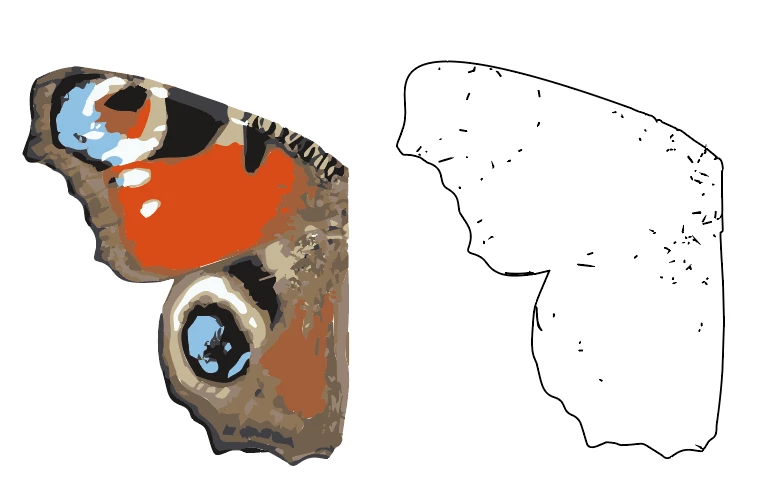
I'm creating a simplified butterfly wing for a project I'm working on. 

I've imported a jpg then used image trace to make a vector with 10 colours.

I now want to create a black line around the outside of the wing.

I've made a copy, filled it with white, added a black stoke then used pathfinder to create the outline. Unfortunately, the result is filled with these speck and short lines. Is there an easy way to remove these

and make a clean outline stoke? Thanks!

R.

(can't work out how to add a .ai file) 

This topic has been closed for replies.
Correct answer Monika Gause

Use the group selection tool and click exactly on one of the anchor points of the outer path of it.

Edit > Cut

Select and delete all the leftovers

Edit > Paste in place

1 reply

Monika Gause
Community Expert
Monika GauseCommunity ExpertCorrect answer
Community Expert
February 29, 2020

Use the group selection tool and click exactly on one of the anchor points of the outer path of it.

Edit > Cut

Select and delete all the leftovers

Edit > Paste in place

Participant
February 29, 2020

That's great! Thank you. Worked a treat. I haven't used the Group selection tool before.

Monika Gause
Community Expert
Community Expert
February 29, 2020

You're welcome.