Participant
January 2, 2018
Answered

Renaming Sublayers/Text Objects

  • January 2, 2018
  • 2 replies
  • 1547 views

I'm running into a problem and I thought the best place to ask would be here. The project I'm working on is a plot/plat map, so there are tiny boxes where a home etc would go. I have to make several layers of just numbers (for the elevation, or the lot number) and sometimes those lots number into the 100s. I've been looking for a script that would take the layers/objects I've selected and append whatever text I need.

In the case of the screenshot below, I need to append "number-" before everything. On another layer I need to put "elevation-" before everything.
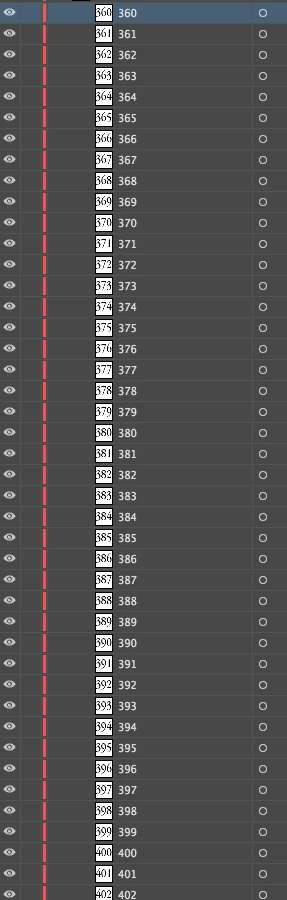
I CAN do it by hand, but this can take hours doing it on three different layers, especially when something goes from 360 to 620.

A script I've tried messing with is below which Illustrator decidingly does not like.

var idoc = app.activeDocument; 

    for (var l=0; l<idoc.layers.length; l++) { 

    var ilayer = idoc.layers

    for (i=0; i<ilayer.layers.length; i++) { 

        var sublayer = ilayer.layers

        sublayer.name = 'num-' + ilayer; 

    } 

}

This topic has been closed for replies.
Correct answer Disposition_Dev

give this a go..

function renameLayers()

{

    //change this variable to the name of

    //the layer for which you want to

    //prepend "number-" to each child element

    var numberLayerName = "Numbers";

    //change this variable to the name of

    //the layer for which you want to

    //prepend "elevation-" to each child element

    var elevationLayerName = "Elevation";


    if(!app.documents.length)

    {

        alert("You must have at least one document open.");

        return;

    }

    var docRef = app.activeDocument;

    var layers = docRef.layers;

    //verify the necessary layers exist

    var curLayer;

    try

    {

        curLayer = numberLayerName;

        var numberLayer = layers[curLayer];

        curLayer = elevationLayerName;

        var elevationLayer = layers[curLayer];

    }

    catch(e)

    {

        alert("Sorry. The layer \"" + curLayer + "\" does not exist.");

        return;

    }

    //rename the children of the numberLayer

    for(var x=0,len=numberLayer.pageItems.length;x<len;x++)

    {

        numberLayer.pageItems.name = "number-" + numberLayer.pageItems.name;

    }

    //rename the children of the elevationLayer

    for(var x=0,len=elevationLayer.pageItems.length;x<len;x++)

    {

        elevationLayer.pageItems.name = "elevation-" + elevationLayer.pageItems.name;

    }

}

renameLayers();

2 replies

CarlosCanto
Community Expert
Community Expert
January 2, 2018

are those Text Items?

the script renames Sublayers not objects. If those are text frames this script should work

var idoc = app.activeDocument;

    for (var l=0; l<idoc.layers.length; l++) {

    var ilayer = idoc.layers;

    for (i=0; i<ilayer.textFrames.length; i++) {

        var tf = ilayer.textFrames;

        tf.textRange.contents = 'num-' + tf.textRange.contents;

    }

}

but it renames all text frames in the document. It'll need to be modified to do something more useful.

Disposition_Dev
Disposition_DevCorrect answer
Legend
January 2, 2018

give this a go..

function renameLayers()

{

    //change this variable to the name of

    //the layer for which you want to

    //prepend "number-" to each child element

    var numberLayerName = "Numbers";

    //change this variable to the name of

    //the layer for which you want to

    //prepend "elevation-" to each child element

    var elevationLayerName = "Elevation";


    if(!app.documents.length)

    {

        alert("You must have at least one document open.");

        return;

    }

    var docRef = app.activeDocument;

    var layers = docRef.layers;

    //verify the necessary layers exist

    var curLayer;

    try

    {

        curLayer = numberLayerName;

        var numberLayer = layers[curLayer];

        curLayer = elevationLayerName;

        var elevationLayer = layers[curLayer];

    }

    catch(e)

    {

        alert("Sorry. The layer \"" + curLayer + "\" does not exist.");

        return;

    }

    //rename the children of the numberLayer

    for(var x=0,len=numberLayer.pageItems.length;x<len;x++)

    {

        numberLayer.pageItems.name = "number-" + numberLayer.pageItems.name;

    }

    //rename the children of the elevationLayer

    for(var x=0,len=elevationLayer.pageItems.length;x<len;x++)

    {

        elevationLayer.pageItems.name = "elevation-" + elevationLayer.pageItems.name;

    }

}

renameLayers();

Participant
January 2, 2018

That's perfect, thank you!