

Roger Breton
Legend
July 25, 2024
Question

Repeat > Grid only works with "Proportional Shapes"?

  • July 25, 2024
  • 3 replies
  • 604 views

I am running into a bit of frustration with the Repeat > Grid command.

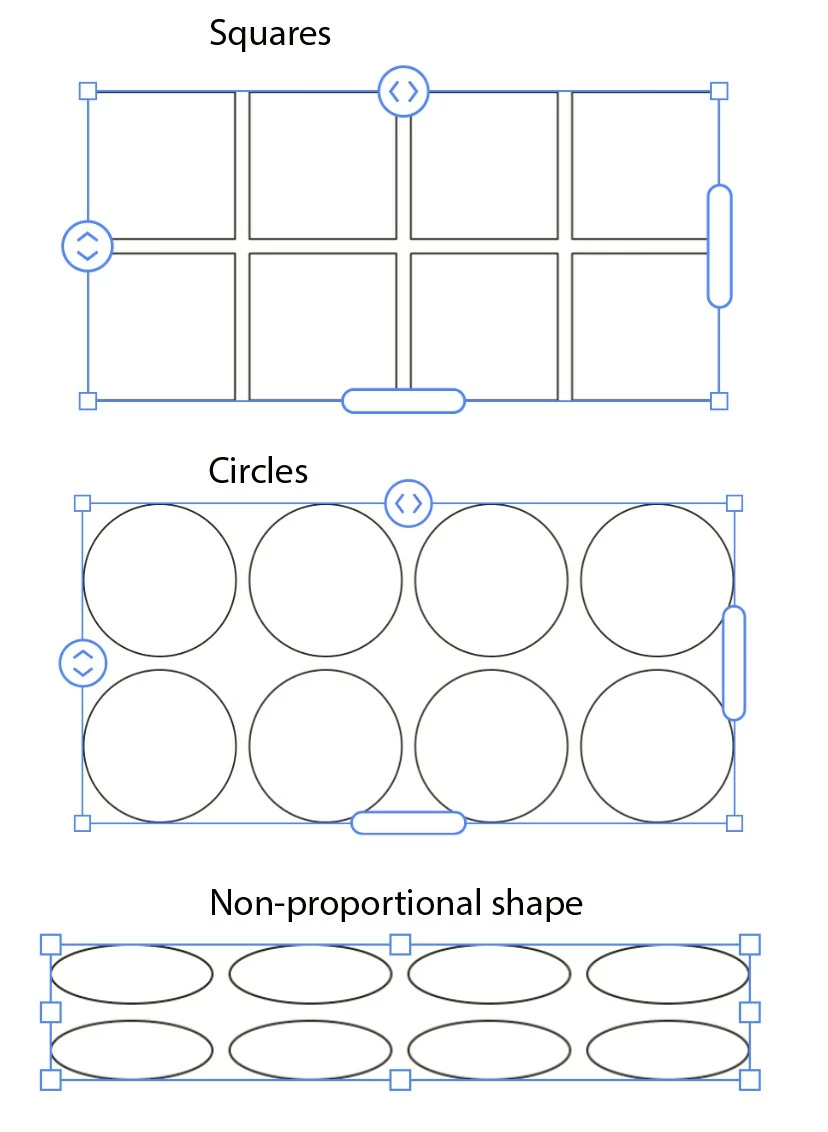
I wanted to experiment with rectangle shapes but it seems it's only working with "regular" / 'proportional" kinds of shapes like "Squares" and "Circles"? Here is a screen capture of three kinds of shapes obtained through the Repeat > Grid command. As you can see, the "Squares" and "Circles" behave as expected but the "Oval" at the bottom is not being "honored" by the command? All I get is a kind of "Step and Repeat":

Is it possible that it only honors what are considered as "Shapes"?
This topic has been closed for replies.

3 replies

Kurt Gold
Community Expert
Community Expert
July 25, 2024

Looks like your "Non-proportional" sample in the screenshot is a selection of two (or more) separate Repeat objects.


Can you share a sample Illustrator file in case that does not apply?

Roger Breton
Legend
July 25, 2024
Kurt Gold
Community Expert
Community Expert
July 25, 2024

Thanks for the sample file.


When you zoom in a bit the Repeat widgets should appear.


Obviously, this is a bug in conjunction with the zoom level (not with the actual objects).

Ton Frederiks
Community Expert
Community Expert
July 25, 2024

Seems to work with wathever object I start with.

Monika Gause
Community Expert
Community Expert
July 25, 2024

These shapes are still ellipses:

Roger Breton
Legend
July 25, 2024

I agree, Monika.

But, depending how the "Ellipŝe" is contructed with the Ellipse tool, Repeat does not work:

This "Ellipse", for example, does not Repeat.