
Participating Frequently
June 3, 2024
Answered

Replace All Button Missing

  • June 3, 2024
  • 3 replies
  • 1490 views

hi, 

since the new update or even before there is one immprtant Button Missoing: 
"replace all". 
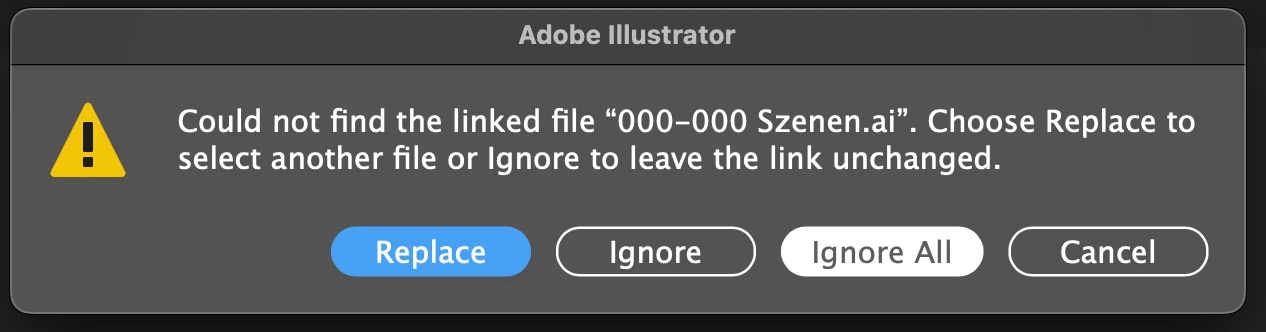
When i open a document in which i connected an other illlustrator document with several artboards, usually i was asked if i want to replace all of them at once. Now this possibility is gone and i have to replace the artboards manually!! Why? How can i avoid this?
 

This topic has been closed for replies.
Correct answer Ton Frederiks

There used to be an Apply to All checkbox, now there is a Replace Button and when clicked, an option to find all missing links in the same folder.

3 replies

OrhanTekis
Participant
July 22, 2024

[abuse removed]
By canceling the Replace All option, you are [abuse removed] users who perform mounted operations. When you upgrade the version of the program we paid for, you cancel features that are useful to people. For this reason, we still have to use the old version. Even though we wrote so much, you don't make any corrections. What exactly is your intention? [abuse removed] There was FreeHand before, you took it and destroyed it. You have become a monopoly. If you continue like this, we will stop writing to you. As Mac users, you are forcing us to use another program. What you are doing is a great injustice.
I installed version 28.6 today, but again there is no Replace All feature. I will have to delete it and use the old version again.[abuse removed]


Note from moderator: please follow the forum guideline and refrain from abusive language. If you continue, you risk being banned from the forums. Also refrain from triplicate posts. This is a user-to-user forum and you are talking to volunteers.


Ton Frederiks
Community Expert
Community Expert
July 22, 2024
Ton Frederiks
Community Expert
Community Expert
June 3, 2024

It is a different function now, it will relink missing files, but not replace them.

JakkkubAuthor
Participating Frequently
June 3, 2024

Example as i used it to create a Storyboard with Panels. Each Panel was an Artboard in an Illustrator File A. In a second Illustrater File B i collected all the Artboards to put them together in a Storyboard format.

The second Illustrator Format used to see all the Artboads in the fist File without a problem. Now, when i replace this fist File, i have to connect the same File as many times as i placed an Artbord. 

Ton Frederiks
Community Expert
Ton FrederiksCommunity ExpertCorrect answer
Community Expert
June 3, 2024

There used to be an Apply to All checkbox, now there is a Replace Button and when clicked, an option to find all missing links in the same folder.

JakkkubAuthor
Participating Frequently
June 3, 2024

thats right, but this does not work with Artboards any more. 

Ton Frederiks
Community Expert
Community Expert
June 3, 2024

Can you describe what does not work with artboards anymore? Relinking to the artboard linked in the file works for me. Replacing the link with a new file does not work.

Edit: I see that you want to replace instead of fix a missing link, that does not work unfortunately.