
Participant
June 4, 2022
Question

replace specific name in layer in adobe illustrator

  • June 4, 2022
  • 4 replies
  • 398 views

Hi,

I have really tried but can't really understand the illustrator script guide.

I want to rename my selected layer with the name "copyfx" but what changes are all layers

what's wrong with this script?

//

var document = app.activeDocument;
var layers= document.layers;

for(var i =0; i < layers.length;i++) {
layers[i].name ="copyfx";
}
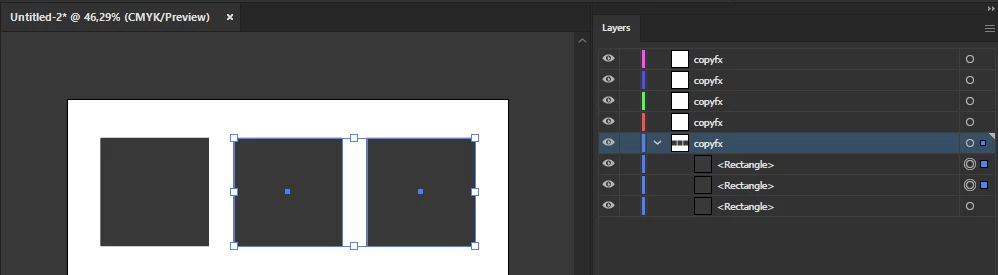


is there a way to solve it? thanks


This topic is closed to new replies. Start a new post to keep the conversation going.

4 replies

femkeblanco
Legend
June 4, 2022

The above script loops through all the layers and names each layer, as it is written to do. 


Layers don't have a "selected" property, but they do have a "hasSelectedArtwork" property.  One can add a conditional to test whether or not a layer "hasSelectedArtwork", limiting the naming to those layers which do.


var document = app.activeDocument;
var layers = document.layers;
for (var i = 0; i < layers.length; i++) {
    if (layers[i].hasSelectedArtwork == true) {
        layers[i].name = "copyfx";
    }
}


Participant
June 4, 2022

this works, but what I mean is renaming the active sublayer, is there a workaround?


femkeblanco
Legend
June 4, 2022

There are no sublayers in the image.  There are layers and path items. This will name the active layer. 


var document = app.activeDocument;
document.activeLayer.name = "copyfx";