
prema56615405
Inspiring
July 26, 2019
Answered

Reset ruler origin - Javascript

  • July 26, 2019
  • 3 replies
  • 4198 views

Dear All,

I am trying to set the ruler origin to the top left in Artboard by using below javascript. But it is set on the bottom left.

Can you please guide me?

var doc = app.activeDocument; 

app.activeDocument.rulerOrigin = [0,0];
This topic has been closed for replies.
Correct answer renél80416020

Salut,

Si c'est pour l'origine globale (règles globales):

var doc = activeDocument;

      doc.rulerOrigin = [0,doc.height]

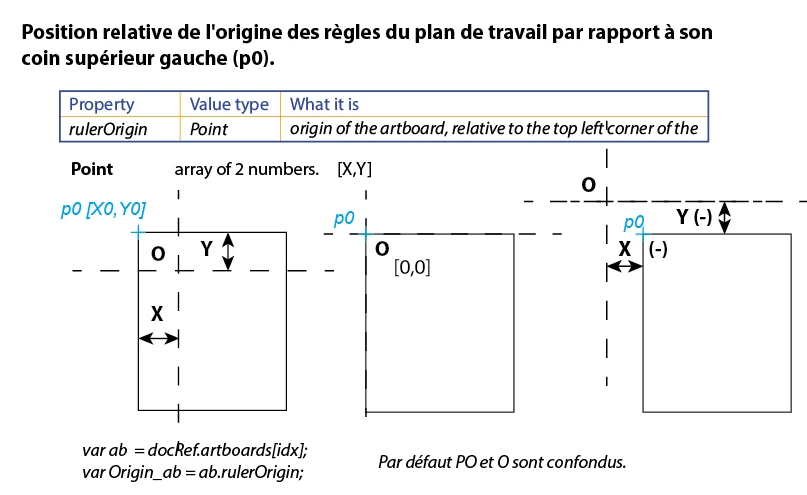
Pour l'origine des règles du plan de travail, c'est différent: (réponse de Lumenn )

3 replies

renél80416020
renél80416020Correct answer
Inspiring
July 27, 2019

Salut,

Si c'est pour l'origine globale (règles globales):

var doc = activeDocument;

      doc.rulerOrigin = [0,doc.height]

Pour l'origine des règles du plan de travail, c'est différent: (réponse de Lumenn )

prema56615405
Inspiring
July 29, 2019

Thank you so much. You are always excellent.

Lumenn
Inspiring
July 26, 2019

I can't find any scripting way to change ruler type from document to artboard.

When you change ruler type to artboard, then above code will work.
Maybe someone else have an indea how to change ruler type from script.

Coordinate system doesn't seem to have any ifnluence on this.

Lumenn
Inspiring
July 26, 2019

Does it change, when you select other artboards?
For me it's by default on top left of the artboards.


Try setting the coordinate system to artboard based:

app.coordinateSystem = CoordinateSystem.ARTBOARDCOORDINATESYSTEM;

Application — Illustrator Scripting Guide 0.0.1 documentation

prema56615405
Inspiring
July 26, 2019

Thanks for your reply Lumenn.

Normally it will come on the top left of the artboards.

By mistakenly, if i changed the ruler origin, how to make it to zero point by using javascript?

Lumenn
Inspiring
July 26, 2019

Then as i've found here:

Change origin of artboard rulers

Rulers are per artboard, you have to set the origin for each arboard, for example:

app.activeDocument.artboards[0].rulerOrigin = [0,0];

Will set the ruler to top left corner of 1st - [0] - artboard in the document