Known Participant
January 22, 2018
Answered

Resize Problem

  • January 22, 2018
  • 2 replies
  • 793 views

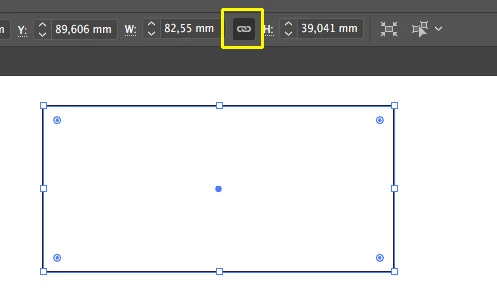
I have a really strange resize problem. Everytime I resize an object or object Illustrator seems to be snapping to some imaginary grid. I have turned off all snapping options I can find. However if for example I resize an object's height to 30cm with constrain proportions turned off it still changes the width??? If I turn on constain proportions and try again to resize the object's height to 40cm it will change the setting to 39.273 mm??? What the heck is going on?
    This topic has been closed for replies.
    Correct answer ceyhun_akgun

    Solutions:

    1- Note the "chain" symbol between Width and High.

    2- Preferences> General> Use Preview Bounds option. Maybe it can be open, it can be effective on line thicknesses.

    2 replies

    ceyhun_akgun
    ceyhun_akgunCorrect answer
    Legend
    January 22, 2018

    Solutions:

    1- Note the "chain" symbol between Width and High.

    2- Preferences> General> Use Preview Bounds option. Maybe it can be open, it can be effective on line thicknesses.

    Graphic Designer Educator / PrePress Consultant
    Dr TyrellAuthor
    Known Participant
    January 22, 2018

    Thanks, I unchecked the Preview Bounds option and now the resizing seems ok. So why would this affect my resizing? If I specify I want 30cm width and then Illustrator changes what I input to 30.006 what possible use is that?

    ceyhun_akgun
    Legend
    January 22, 2018

    The "stroke" value of the object is included in the measurement.

    Graphic Designer Educator / PrePress Consultant
    Kurt Gold
    Community Expert
    Community Expert
    January 22, 2018

    What happens if you quit Illustrator and restart your PC?