
Inspiring
March 21, 2023
Answered

Resolution for Printing as Part of Workflow

  • March 21, 2023
  • 1 reply
  • 1205 views

Hi Folks.  So I have a question or two to try to get my head around the concept of PPI for a print workflow.

(I am designing for a non-profit local group and this is my first print run - I normally do online only)


1) My understanding is that an AI file containing only drawn vector elements starts off without any "resolution".

It can be scaled indefinitely. Correct?


2) When you place an AI file in In Design (ID), the same applies?  I.e. it's fully scalable.


3) If you export from AI as SVG, it has a Decimal value which seems to affect the quality in final product. Therefore always use AI files and don't export as SVG first and use them? (this finding seemed to vary for me across different SVG files I have...)


4) Effects applied in either AI or ID are stored as "the effect", and therefore don't really have a resolution either?


5) The only time a resolution is applied, is when exporting to PDF for print, and you have a compression value?


6) The compression only applies to effects/images?  (I tried zooming to 6400 on the PDF and objects from AI files looked pefectly smooth, only effects were affected)


The printer is asking for halftone images to be 300 DPI and line images to be at least 1200 DPI.


7) I assume that halftone applies to actual images and effects (ie elements that are rastered when saving to PDF), and that line images refers to text/AI objects?


😎 Given the printer requirements, if I choose downsample to 300, that will work for images/effects, and the AI files will be at infinite resolution, so all good?


9) If I choose "Do not downsample", I assume images will be in their original res, however what resolution would the effects be in?


Is there anywhere in the workflow before export that has an impact on the final output...


10) E.g. if I apply an effect in AI, does the Document Raster Effect Settings value determine the max res that I will get in ID?


11) If yes, can I change that from default (300) to 1200 without any problems?


12) Will it really make a difference?


It looks from testing, that if I apply an effect in AI, and set the Raster setting to 1200, an exported PDF from ID (using that AI object) with no downsampling has better quality than if I apply the effect in ID which is perhaps then exporting with 300 PPI...


13) If so, is there a similar setting in ID to set the PPI of rastered effects?


I know it's a lot of questions, however I am hoping the answers will mostly just be "that's correct"!


Many thanks in advance!

Dave
This topic has been closed for replies.
Correct answer wcn_dave

First of all, many thanks for taking the time to reply.  I did some more testing as a result, and had a few follow on thoughts.

I also had been using "asset export" as a cool way to have an AI full of things that become individual assets for use in projects.  However seeing the problems with SVG, I then wanted to use AI files.  But then using that in ID when a file contained 20 artboards with many elements was also not great.

In the end, I found just dragging what I wanted to the CC library was easiest, however then I have to remember that if I amke a global change to my set of assets, to re-export and if I edit the asset, I will have divergence.  But not a big deal.


So now I have ID files full of AI objects, pix-images, SVG from 3rd parties. But no self created non-AI assets unless true pictures.


Effects that result in rasterisation are indeed resolution dependent. It seems like you've figured this out based on mentions of Document Raster Effects settings later in the post.

When exporting to PDF, "compression" refers mainly to JPEG compression of raster images in the composition. Text and vector elements may be subject to a somewhat different "compression" that as far as I know, consists mainly of removal of redundancy, as opposed to reduction in quality.


What I found with more testing was:
PDF supports vector art, so the quality is still infinite.
Anything that is rastered, pixel-images / AI and ID effects etc is rastered at the PPI selected in the output compression settings, however effects in ID had a max level.
For effects that were applied in AI, you'd take the lowest of the two settings, Raster Effects in AI, and compression in ID.

However, the quality improves with a combo of the two settings, even if you'd think one surpases the other...


So below you see a grid of the result of drop shadow in exported PDF.  Down the left is the Document Raster Settings value, and across you have the export compression downsampling value.


You can see that the AI object with setting 300 has the same PPI when InD downsamples to 72.

You can see that the AI object with setting 1,200 has increased PPI over the AI object with setting 300, even when InD downsamples to 300...


A raster effect from AI is no different than a photo in the layout, and needs only 300 ppi (if that) for quality printed output.


Unless you're scaling no?  For example, I have a logo with effect that's on a 10x10cm artboard, and was then being used on a 1m poster, so it was scaled up considerably, and therefore a setting of 300 in AI results in a lower print resolution...


13) If so, is there a similar setting in ID to set the PPI of rastered effects?


No. As far as I know, ID raster effects output at 200 ppi, and it's not adjustable.


I'd rather apply effects in ID, as I use a lot of linked files, and if I need an effect only sometimes, I'd have multiple different AI versions of the same thing, to maintain.... 

However, depending on the situation, it appears it might be better to apply in AI in certain cases...


Thanks again, I feel I have a fairly decent grasp of it now, although that's probably just cognative bias taking over!


1 reply

John Mensinger
Community Expert
Community Expert
March 21, 2023
quote

1) My understanding is that an AI file containing only drawn vector elements starts off without any "resolution".

It can be scaled indefinitely. Correct?


Correct. Vectors are "resolution independent," until output, in that they are rasterized at  the resolution of the output device.

quote

2) When you place an AI file in In Design (ID), the same applies?  I.e. it's fully scalable.


Yes.

quote

3) If you export from AI as SVG, it has a Decimal value which seems to affect the quality in final product. Therefore always use AI files and don't export as SVG first and use them? (this finding seemed to vary for me across different SVG files I have...)


SVG is intended for scalability in on-screen applications. When print is the target, there is no reason to use it.

quote

4) Effects applied in either AI or ID are stored as "the effect", and therefore don't really have a resolution either?


5) The only time a resolution is applied, is when exporting to PDF for print, and you have a compression value?


6) The compression only applies to effects/images?  (I tried zooming to 6400 on the PDF and objects from AI files looked pefectly smooth, only effects were affected)


Here is where you start entering grayer areas.

Effects that result in rasterisation are indeed resolution dependent. It seems like you've figured this out based on mentions of Document Raster Effects settings later in the post.

When exporting to PDF, "compression" refers mainly to JPEG compression of raster images in the composition. Text and vector elements may be subject to a somewhat different "compression" that as far as I know, consists mainly of removal of redundancy, as opposed to reduction in quality.

quote

The printer is asking for halftone images to be 300 DPI and line images to be at least 1200 DPI.


7) I assume that halftone applies to actual images and effects (ie elements that are rastered when saving to PDF), and that line images refers to text/AI objects?


Some erroneous terms aside, those are pretty standard print-provider specs. Yes, "halftone images" refers to raster photos/graphics, but "line images" also means raster images, e.g., a black-and-white-only scan of an Engineer's drawing or someone's signature. Vector elements and text remain resolution-independent until they are rasterized at the resolution of the output device upon output.

quote

😎 Given the printer requirements, if I choose downsample to 300, that will work for images/effects, and the AI files will be at infinite resolution, so all good?


9) If I choose "Do not downsample", I assume images will be in their original res, however what resolution would the effects be in?


Is there anywhere in the workflow before export that has an impact on the final output...


10) E.g. if I apply an effect in AI, does the Document Raster Effect Settings value determine the max res that I will get in ID?


11) If yes, can I change that from default (300) to 1200 without any problems?


12) Will it really make a difference?


It looks from testing, that if I apply an effect in AI, and set the Raster setting to 1200, an exported PDF from ID (using that AI object) with no downsampling has better quality than if I apply the effect in ID which is perhaps then exporting with 300 PPI...


You may be conflating AI raster effects with the vector nature of the original un-effect'ed element, and the printer's 1200 ppi specification for "line images". A Document Raster Effects setting at 1200 ppi would only bloat the file and needlessly add processing time to output. A raster effect from AI is no different than a photo in the layout, and needs only 300 ppi (if that) for quality printed output.

quote

13) If so, is there a similar setting in ID to set the PPI of rastered effects?


No. As far as I know, ID raster effects output at 200 ppi, and it's not adjustable.

wcn_daveAuthorCorrect answer
Inspiring
March 24, 2023

First of all, many thanks for taking the time to reply.  I did some more testing as a result, and had a few follow on thoughts.

I also had been using "asset export" as a cool way to have an AI full of things that become individual assets for use in projects.  However seeing the problems with SVG, I then wanted to use AI files.  But then using that in ID when a file contained 20 artboards with many elements was also not great.

In the end, I found just dragging what I wanted to the CC library was easiest, however then I have to remember that if I amke a global change to my set of assets, to re-export and if I edit the asset, I will have divergence.  But not a big deal.


So now I have ID files full of AI objects, pix-images, SVG from 3rd parties. But no self created non-AI assets unless true pictures.


Effects that result in rasterisation are indeed resolution dependent. It seems like you've figured this out based on mentions of Document Raster Effects settings later in the post.

When exporting to PDF, "compression" refers mainly to JPEG compression of raster images in the composition. Text and vector elements may be subject to a somewhat different "compression" that as far as I know, consists mainly of removal of redundancy, as opposed to reduction in quality.


What I found with more testing was:
PDF supports vector art, so the quality is still infinite.
Anything that is rastered, pixel-images / AI and ID effects etc is rastered at the PPI selected in the output compression settings, however effects in ID had a max level.
For effects that were applied in AI, you'd take the lowest of the two settings, Raster Effects in AI, and compression in ID.

However, the quality improves with a combo of the two settings, even if you'd think one surpases the other...


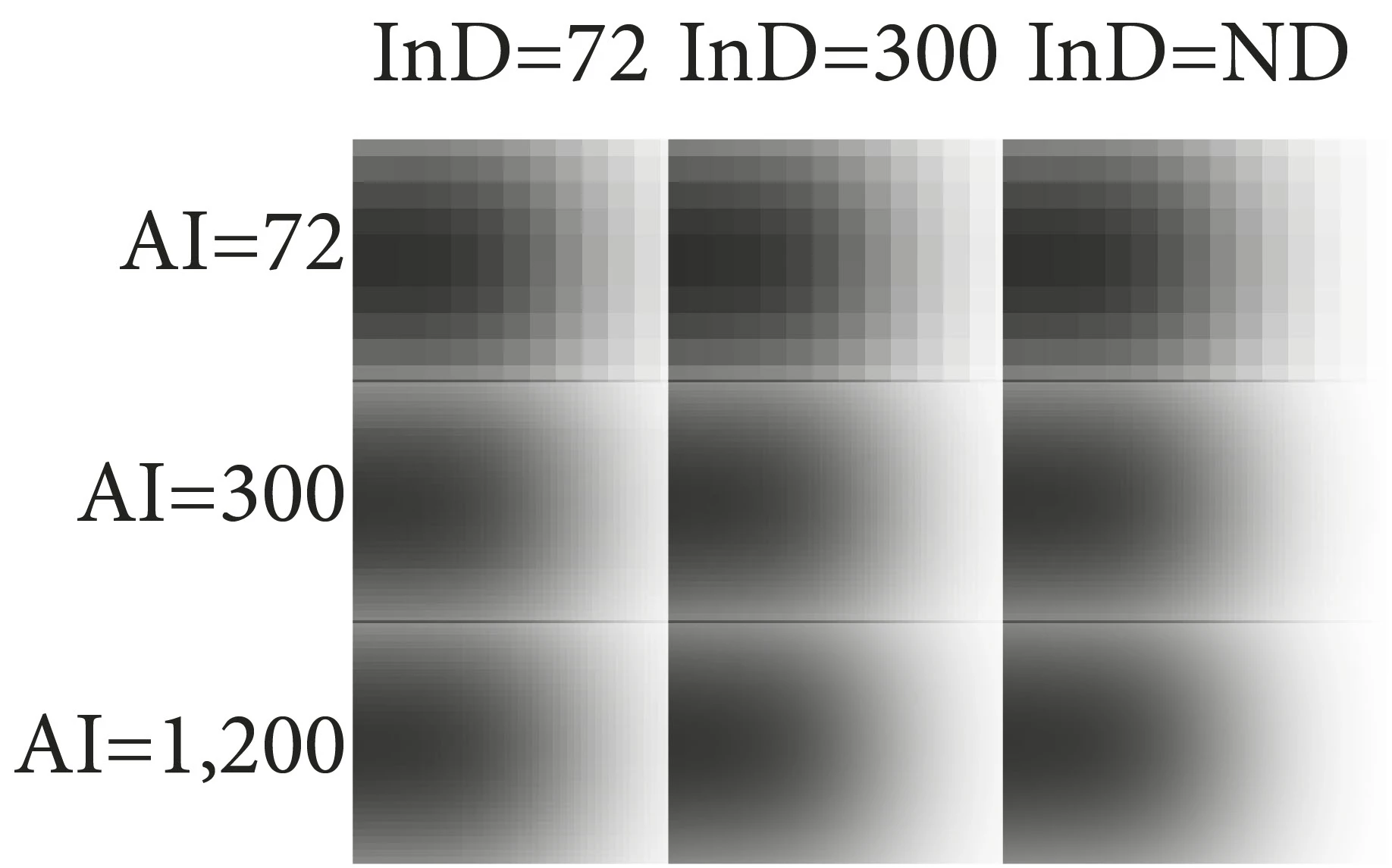
So below you see a grid of the result of drop shadow in exported PDF.  Down the left is the Document Raster Settings value, and across you have the export compression downsampling value.


You can see that the AI object with setting 300 has the same PPI when InD downsamples to 72.

You can see that the AI object with setting 1,200 has increased PPI over the AI object with setting 300, even when InD downsamples to 300...


A raster effect from AI is no different than a photo in the layout, and needs only 300 ppi (if that) for quality printed output.


Unless you're scaling no?  For example, I have a logo with effect that's on a 10x10cm artboard, and was then being used on a 1m poster, so it was scaled up considerably, and therefore a setting of 300 in AI results in a lower print resolution...


13) If so, is there a similar setting in ID to set the PPI of rastered effects?


No. As far as I know, ID raster effects output at 200 ppi, and it's not adjustable.


I'd rather apply effects in ID, as I use a lot of linked files, and if I need an effect only sometimes, I'd have multiple different AI versions of the same thing, to maintain.... 

However, depending on the situation, it appears it might be better to apply in AI in certain cases...


Thanks again, I feel I have a fairly decent grasp of it now, although that's probably just cognative bias taking over!