
Answered
Restore Default Toolbar
One day it seems I dragged an icon off the toolbar because the order of the tools got shuffled.
How does one restore the default toolbar in Illustrator cc 23.01?
Thanks.
One day it seems I dragged an icon off the toolbar because the order of the tools got shuffled.
How does one restore the default toolbar in Illustrator cc 23.01?
Thanks.
Click the 3 dots at the bottom of the toolbar.

Click the menu in the upper right and choose Reset.
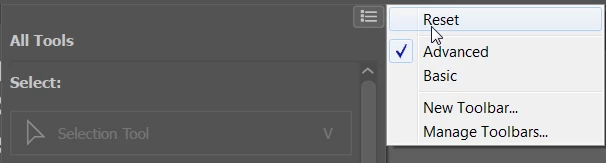
If you want all the tools to show in the toolbar, which is my preference, choose Advanced.
Already have an account? Login
Enter your E-mail address. We'll send you an e-mail with instructions to reset your password.
 AdChoices