
Alaa-Azzam
Participant
January 28, 2019
Answered

Restoring strike-slip fault on a geologic map

  • January 28, 2019
  • 2 replies
  • 876 views

Hello,

Do you know if there is a way in Illustrator to restore on a geologic map displaced outcrops along a strike-slip fault plane??

N.B: The strike-slip fault in geology, is a plane of deformation which displaces a rock outcrop (object) horizontally (after splitting it into two parts). I have attached a link of an image where you can see a pink outcrop displaced by a fault over almost 80km. In fact, I am a PhD student in geology. I would like to do this but I am not sure if it is possible.

Hope I was clear, and someone will help me.

Thank you.
Google Image Result for https://www.researchgate.net/profile/Wang_Shifeng2/publication/233174256/figure/fig6/AS:46156280…

    This topic has been closed for replies.
    Correct answer Myra Ferguson

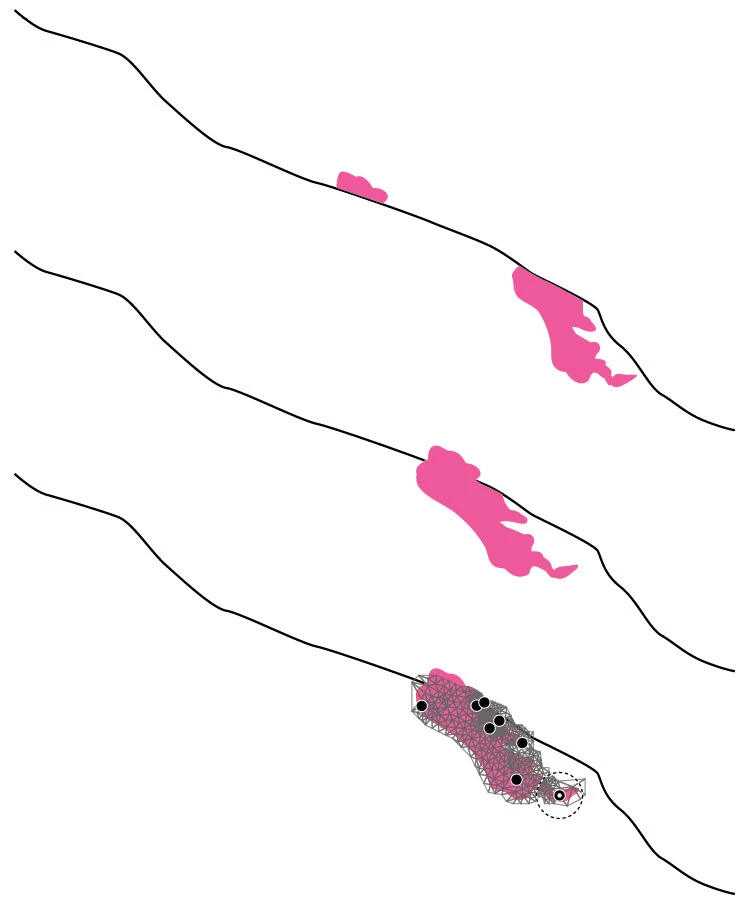
    I don't really know what you're starting out with, but if it's a raster image, it might be easier to work with if you trace the main parts manually. Then, like Jacob mentioned, the non-straight line will require more than just a move. I would recommend using Puppet Warp (Transform vector graphics using the Puppet Warp tool ) to make the deformation. Below are before and after examples (with the last one showing the mesh from the deformation) based on the image in the link you provided.

    2 replies

    Myra Ferguson
    Community Expert
    Myra FergusonCommunity ExpertCorrect answer
    Community Expert
    January 29, 2019

    I don't really know what you're starting out with, but if it's a raster image, it might be easier to work with if you trace the main parts manually. Then, like Jacob mentioned, the non-straight line will require more than just a move. I would recommend using Puppet Warp (Transform vector graphics using the Puppet Warp tool ) to make the deformation. Below are before and after examples (with the last one showing the mesh from the deformation) based on the image in the link you provided.

    Alaa-Azzam
    Participant
    January 29, 2019

    Myra, thank you very much for your answer and thanks also for the examples that you’ve drawn. It is exactly what I would like to do. Yes I am going to use a raster image (the geologic map) and recreate/draw the main parts on it separately and manually before doing the restoration.

    As I told Jacob before, I was wondering if Illustrator could have a feature that allows me (if I trace the main parts manually and separately) to let me move (“glide”) the right pink part against the fault’s trace in one single move (I mean if Illustrator can recognize the fault’s trace and let the right pink part follows this fault-line path) until joining the right pink part.

    However, this Puppet Warp tool seems interesting because in your sketches, you could restore the displacement perfectly. I didn’t try it before. However I didn’t understand very well what are the black points on the last example? Are those the pins that I should create using the Puppet Warp tool? And you put the pins on both left and right parts of the displaced objects, or only on one of them?

    Myra Ferguson
    Community Expert
    Community Expert
    January 29, 2019

    Yes, the black points are pins. You can move and/or rotate any pin. When you select your shape then select the Puppet Warp Tool, Illustrator will automatically add pins to the mesh. You can add more pins for more precise control of deformations wherever you want.

    Monika Gause
    Community Expert
    Community Expert
    January 28, 2019

    What do you want to draw?

    There are a couple of elements on your examples. Please point out your issue. Only a rare minority here might be geologists.

    Alaa-Azzam
    Participant
    January 29, 2019

    Thanks for your remark.

    I would like to draw a geologic map with contours (representing the outcrops) and a line (representing the strike-slip fault).

    Then, I would like to move (displace) the outcrops (contours) existing on the right side of the fault (line), along the fault line itself (which is not perfectly straight), so that those right outcrops join their equivalents on the left side of the fault (because they both have been displaced by the fault with certain distance). On the image that I shared (link), you can see the pink contours displaced (80km) on both sides of the fault (line). So, I would like to let one of them join the second by displacing it along the fault plane/line itself, using the same offset (offset=80km).

    Is it clear?

    Thank you

    Monika Gause
    Community Expert
    Community Expert
    January 29, 2019

    Please draw a sketch.