
Inspiring
May 2, 2023
Answered

Ridges appearing in OBJ's exported into Adobe Dimension from Illustrator

  • May 2, 2023
  • 2 replies
  • 1067 views

Hi Community,


I recently created a very simple bottle shape using Adobe Illustrator. I love using this feature to create custom shapes, then export them into Adobe Dimension for some polishing.


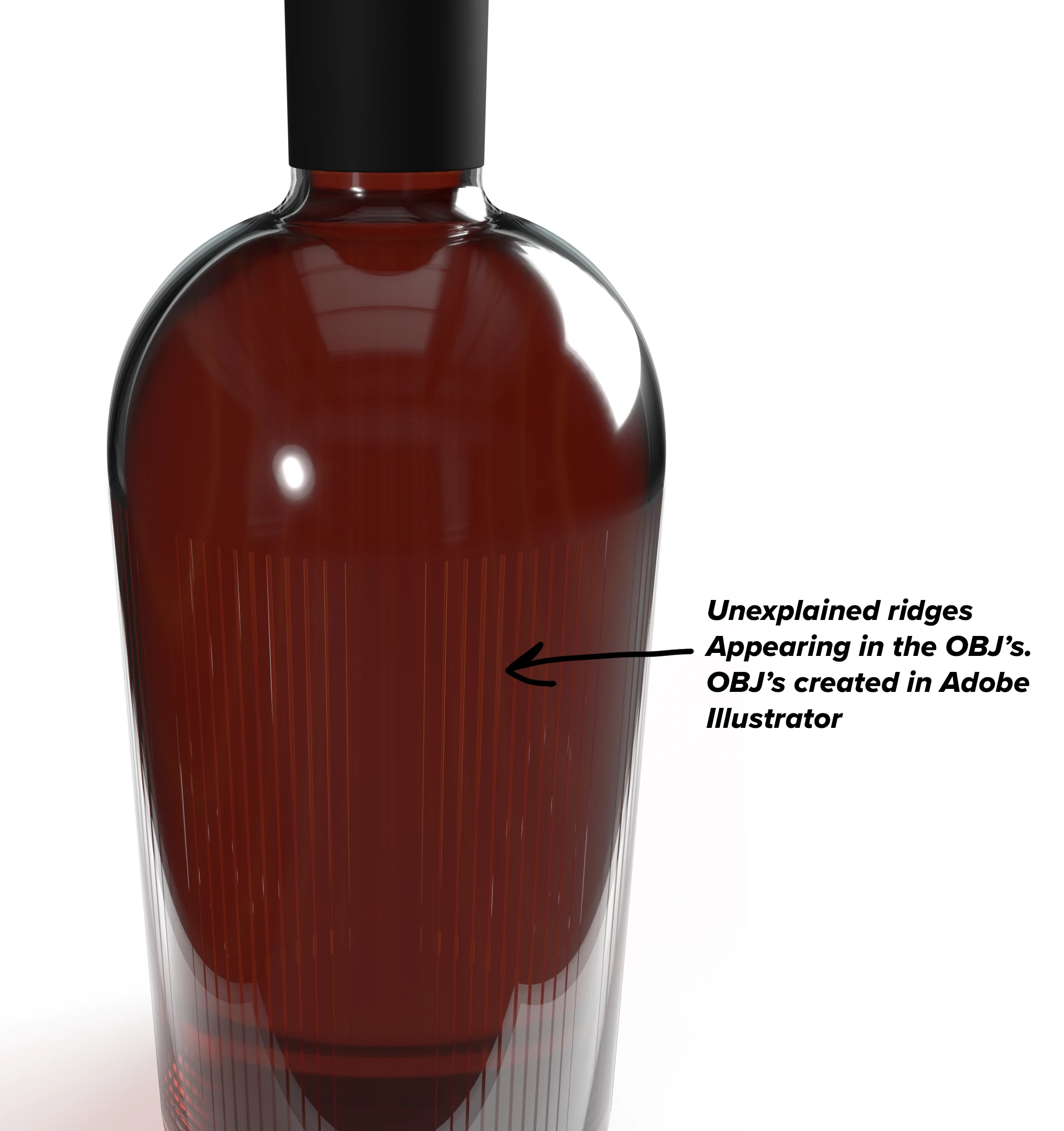
However, this recent import into Dimension shows ridges around the bottle.  Not good.  This should be clear.


I created the shape using Adobe Illustrator 3D revolve tool. Looks great in Illustrator, no ridges at all.


Has anyone experianced the same, and is there a way to adjust this?


Picture attached that shows what I'm experiancing


Thanks!

Steve 
This topic has been closed for replies.
Correct answer stevestrauch

Thanks for your responce, Ares.  I've found the solution: the ridges are occuring between the bottle shape and the liquid within. When building the shape for the liquid, I selected the innermost line of the bottle as the outside line of the liquid. I just remade the liquid shape by off setting the line away from the bottle. disturbance removed!


Thanks again!

2 replies

Ares Hovhannesyan
Community Expert
Community Expert
May 8, 2023

Here is my bottle from Ai to Dimension (obj). Cant see any artifact in Render preview. Did you use any materials?. May be the lines are material property? Also try GLTF or USDA

stevestrauchAuthorCorrect answer
Inspiring
May 10, 2023

Thanks for your responce, Ares.  I've found the solution: the ridges are occuring between the bottle shape and the liquid within. When building the shape for the liquid, I selected the innermost line of the bottle as the outside line of the liquid. I just remade the liquid shape by off setting the line away from the bottle. disturbance removed!


Thanks again!

Monika Gause
Community Expert
Community Expert
May 2, 2023

Can you upload a demo AI file?

Inspiring
May 8, 2023

Hi Monika,


Thanks for responding and sorry for my delayed responce. I've attached the AI file you requested.  Pretty straight forward and simple. One shape is the bottle (created by revolving the shape in 3D on the right edge), second is the bottle liquid (created the same way). The third is the bottle wrap. Not shown in my original post, but was suffering the same negitive effects.


Additional info: I tried using the same OBJ's in Substance 3D stager, thinking I was experiancing these issues with Dimensions. Same issue.  So, I'm thinking the issue is in Illustrator.


Thanks in advance for your help.

Steve

Inspiring
May 8, 2023

I'm not seeing the attachment... trying again.


I've tried multiple times to attach the AI file (2.5 mgs). No luck. Am I missing something here? Is there another way to post an AI file?