Inspiring
July 14, 2017
Answered

rotating bounding box

  • July 14, 2017
  • 2 replies
  • 4883 views

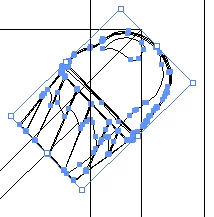
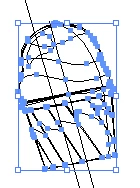
This is probably a dumb question but I've noticed when I rotate objects some times the bounding box rotates with the object and other times it resets to the default positions with the object rotated inside it. Why does this happen and how do I keep the bounding box aligned with the object? I am using Illustrator cc 2017 on a Mac

Thanks

Just to be clear I'm referring to  this vs
    This topic has been closed for replies.
    Correct answer barbara_a7746676

    For most shapes it is normal that the bounding box rotates with the object. To make the bounding box straight again, select the object and choose Object > Transform > Reset Bounding Box.

    2 replies

    Jacob Bugge
    Community Expert
    Community Expert
    July 14, 2017

    Jmginn,

    I wonder whether those are artifacts that can be avoided if you Ctrl/Cmd+E to toggle between GPU and CPU.

    This is what GPU is about:

    https://helpx.adobe.com/illustrator/kb/gpu-performance-preview-improvements.html

    barbara_a7746676
    Community Expert
    barbara_a7746676Community ExpertCorrect answer
    Community Expert
    July 14, 2017

    For most shapes it is normal that the bounding box rotates with the object. To make the bounding box straight again, select the object and choose Object > Transform > Reset Bounding Box.