
Participant
October 30, 2023
Question

rotation not working

  • October 30, 2023
  • 2 replies
  • 143 views

whenever i rotate an incrustated image... smart guides indicates that the image is going the other way, like literraly againts where i'm rotating it.
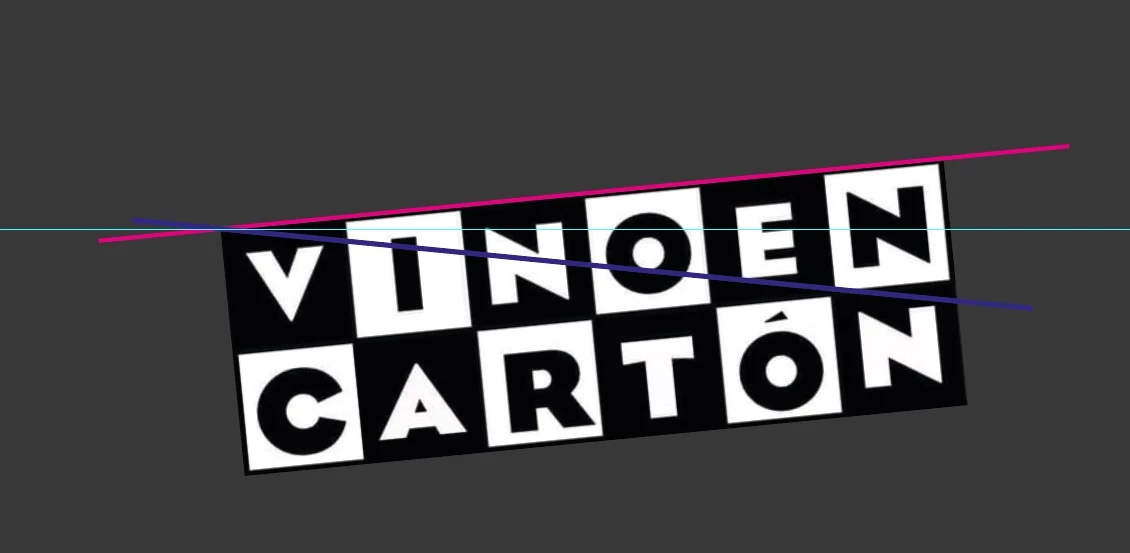
light blue guide: 0° plane.
magenta line: real top hitbox.
blue line: smart guide top hitbox.

like i said, it's literaly going the other way.

This topic has been closed for replies.

2 replies

Monika Gause
Community Expert
Community Expert
October 30, 2023

Is your artboard perhaps rotated?

Or the angle in the Preferences> General is maybe not 0°


You could also try: reboot the computer. Reset the preferences.

Participant
October 30, 2023

like you can see, smart guides indicating the border of the image where there's nothing