


Participant
February 26, 2013
Question

Rounded corner hexagon

  • February 26, 2013
  • 6 replies
  • 21969 views

Using Inkscape, I can easily create an hexagon with rounded courners. The result in below in yellow (the right hexagon). It's possible to see that not only the corners are rounded, but the entire shape is (the lines around the hexagon aren't completely straight). I am now trying to acheive the same effect with Illustrator CS6, but I can't find out how. The closest I got is the white hexagon below (on the left). The corners are rounded but the lines are straight.
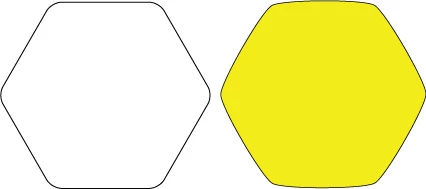
How can I create an hexagon identical to the one in yellow above with Illustrator?

Thanks!

    This topic has been closed for replies.

    6 replies

    TREX8905603
    Participating Frequently
    April 19, 2016

    Hello trude0

    Have you tried this?.... example image below.

    I am using Illustrator CS5.1

    Willi Adelberger
    Community Expert
    Community Expert
    April 19, 2016

    This would not make the 6 lines round, only the corner. Also the lines have to be round. This is easy with CC2015.

    With CS5 it is way more complicated than it is to be done in CC 2015.

    Willi Adelberger
    Community Expert
    Community Expert
    April 18, 2016
    1. Create a 12 corner polygon


    2. Select every other corner with the direct selection tool and drag the widget of one corner for the small round a little bit to inside:
    3. Do the same with the other corner, drag the widget so far as you can inside

      4. Turn it to the position you want


    Willi Adelberger
    Community Expert
    Community Expert
    April 18, 2016

    With this method you can also create similar rounded polygons:

    Participant
    January 23, 2022

    I am confused on how you went from the first image to the second. could you elaborate?

    JETalmage
    Inspiring
    February 27, 2013

    JET

    ScaleHandles

    Participant
    September 18, 2015

    Although the above solution from JET gives a quite nice result, it's not perfectly symmetrical. Neither is the blend approach (you can check by duplicating & rotating the shape and lying it on top of the original. If it's not er perfect fit, it's not symmetrical). Does anyone know of a method that gives a completely symmetrical version of the yellow shape above?

    Any solution will be much appreciated!

    /Simon

    JoeStudio
    Participant
    February 26, 2013

    Vectorscribe/Pathscribe plugin can do this if you feel like paying for a very useful set of tools from Astute Graphics.

    http://www.astutegraphics.com/products/vectorscribe/movies.html#pathscribe

    Steve Fairbairn
    Inspiring
    February 26, 2013

    Try doing it like this:

    Start off by drawing your hexagon and giving it a centre point (Attributes). Then draw a circle outside it from the same centre point.

    Direct select the side anchors only and make a blend between the two objects.

    Check how many steps you need, expand the blend and choose the rounded hexagon you like best.

    Mylenium
    Legend
    February 26, 2013

    I always forget about the more creative uses of blends...

    Mylenium

    Mylenium
    Legend
    February 26, 2013

    You would have to create it in 2 steps using 2 instances of Round Corners, possibly expanding the apperance and subdividing the path inbetween to reinstate some sharp corners the effect can operate on....

    Mylenium