
Answered
Rounded corner option no longer in Rectangle tool
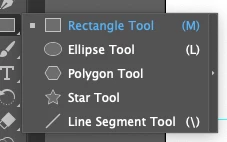
Ever since I first used Illustrator, I was able to select the Rectangle tool, click and hold, and change the shape of a border I was drawing - Rectangle, Elipse, Polygon, etc. That included a rectangle with Rounded Corners. But now, the Rounded Corner option is no longer available in the Rectangle tool. I've found out how to round the corners by going under Effect, Stylize, Round Corners, but that's very inconvenient. It was SO much easier when I could just choose a rounded corner shape from the same place as all the other shapes. Is there a way to fix this? Thank you!
 AdChoices