
Participating Frequently
May 20, 2020
Answered

same clipping mask for multiple objects - repeating

  • May 20, 2020
  • 4 replies
  • 2275 views

Hi everybody, please help!!


does anybody know how to use same mask clipping for each other object.. I`m creating a product catalogue, and have installed creator for ean codes in it, but they are all too big. so I have made smaller rectangle and clipped, and now is there any solution to repeat this (like for example "transform each again (ctrl-D) - but this is not transforming because I want numbers to stay big and just lines to be shorter)

I hope I explained it ok.. I have about 400 ean codes and have to finish it very soon so I`m looking for fastes solution


left code is after clipping mask, right code is original size... is there any repeating action shortcut or something similar
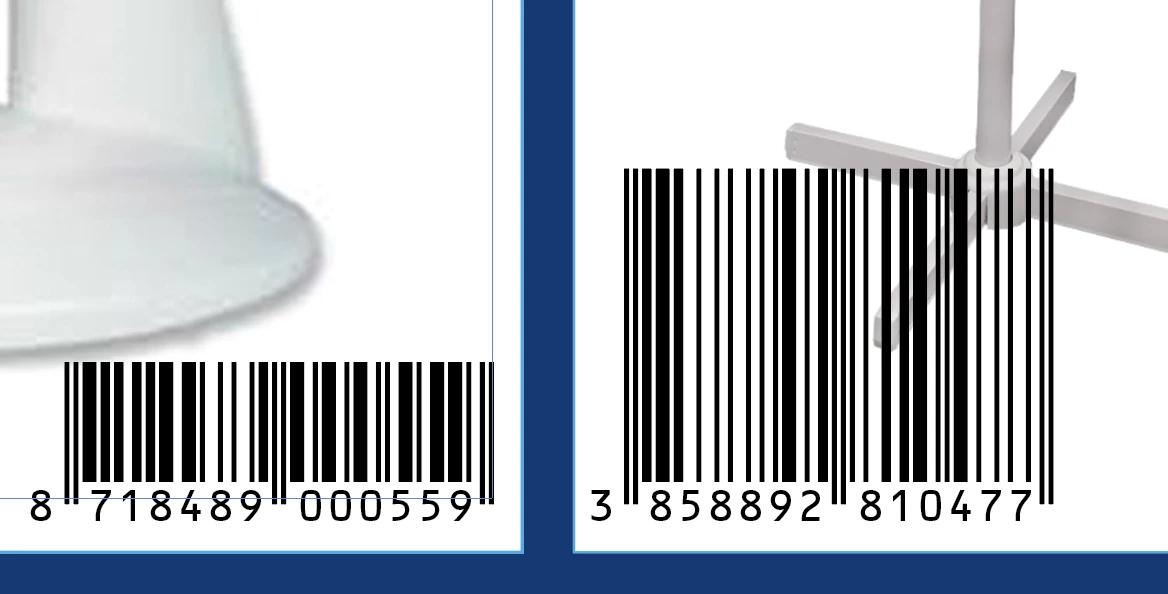


thanks in advance for creative thinking 🙂

This topic has been closed for replies.
Correct answer Ton Frederiks

Good to hear the Action way worked.

You are resizing each line step by step, but you can speed it up by recording Object > Transform >  TransformEach... and scale the lines verically from the bottom (with Scale Strokes unchecked).

The lines need to be ungrouped  for Transform Each to work.

4 replies

GerssonDelgado
Inspiring
May 20, 2020

Hello ,

It must to be with Script, try this,

***************************

//created by Cmartinez-Gdelgado
//Make sure all artworks must to be in a separate artboards//

var i, ii, doc, count, itemList, countArtboards, artboardIndex;
doc = app.activeDocument;
countArtboards = doc.artboards.length;

for (ii = countArtboards-1; ii >= 0; ii--) {
artboardIndex = doc.artboards.setActiveArtboardIndex(ii);
app.executeMenuCommand("selectallinartboard");
app.executeMenuCommand("makeMask");
}
doc.selection = null;
app.redraw();

*********************************

any cuestion let me know! 🙂

Participating Frequently
May 21, 2020

yes it looks like it is the only way, it just takes little time to prepare all artworks on different artboards, but it`s working for one at each board, and then repeat


thank you Gdelgado!

renél80416020
Inspiring
May 21, 2020

Bonjour majak,

Soit, tu as remercié Gdelgado, mais tu as oublié les autres intervenants...

Un peu de correction serait de mise.

René


renél80416020
Inspiring
May 20, 2020

Salut majak!

 Tu règle H à ta mesure et Après sélection des codes barre (image ou groupe)

tu lance le script...

// JavaScript Document for Illustrator
// Réalisation Landry R Wed, 20 May 2020 21:21:52 GMT
// INIT -----
var H = 40;
var dec = 2;
//-----------
var docRef = app.activeDocument;
var selectedItems = selection;
    for (var i = 0; i < selectedItems.length; i++) {
      var item = selectedItems[i];
      var newGroup = layerParent(item).groupItems.add();
          item.move(newGroup,ElementPlacement.PLACEATEND);
      var GBounds = item.geometricBounds;
      var propGobj = prop(GBounds);
      var cadre = newGroup.pathItems.rectangle(GBounds[3]+H,GBounds[0]-dec,propGobj[0]+2*dec, H+dec);
          newGroup.clipped = true;
          newGroup.selected = false;
    }
//--------------------
function layerParent(obj)
{ // détecte le calque parent de obj
  var parent = obj.parent;
  while (parent.typename != "Layer") parent = parent.parent;
  return parent;
}
//---------------
function prop(Bounds) {return [Bounds[2]-Bounds[0],Bounds[1]-Bounds[3]];}
//---------------

de elleere


Participating Frequently
May 21, 2020

sory Rene! speed error..

renél80416020
Inspiring
May 22, 2020

Hi majak!

C'est compris, j'ai cependant une petite remarque, la méthode des masques bien que pratique ne me semble pas très adaptée aux éléments vectoriels.

Je te propose un script qui ajuste la longueur des traits à partir de la base, ainsi les codes barre sont modifiables à tout momment (quelque-soit l'orientation).

(on peut même ajouter des boutons +   -  et view accepté si satisfait)

Le script ne sera pas gratuit.

Si intéressé me contacter par mail.

René

https://share.orange.fr/#qHoaG4zxEY33580601e4


Kurt Gold
Community Expert
Community Expert
May 20, 2020

There may be different approaches to achieve that, but it would be helpful if you were providing at least a couple of sample .ai files, so one may check what could be a reasonably simple way to do what you want to do.

Ton Frederiks
Community Expert
Community Expert
May 20, 2020

Looks like a candidate for a script.

Are these images? Then maybe a Photoshop action can do the job.

Participating Frequently
May 21, 2020

jesus! vector mask and action. i automatically avoid photoshop when doing ean codes, professional deformation 🙂


no, they are not images, I just did screen shot, has to be vectors.

I`ll try and let you know!