fabiank14828111
Participant
September 28, 2017
Answered

Same color swatches in all documents

  • September 28, 2017
  • 2 replies
  • 3753 views

Guys, how to make each document display the same colors in the color swatches panel? I'm tired of adding my palette to every new document

    This topic has been closed for replies.
    Correct answer Bill Silbert

    You can create a New Document Profile. Start by creating a new document and setting up the swatch panel with only the colors that you will want for creating future documents. Save the document to your desktop.
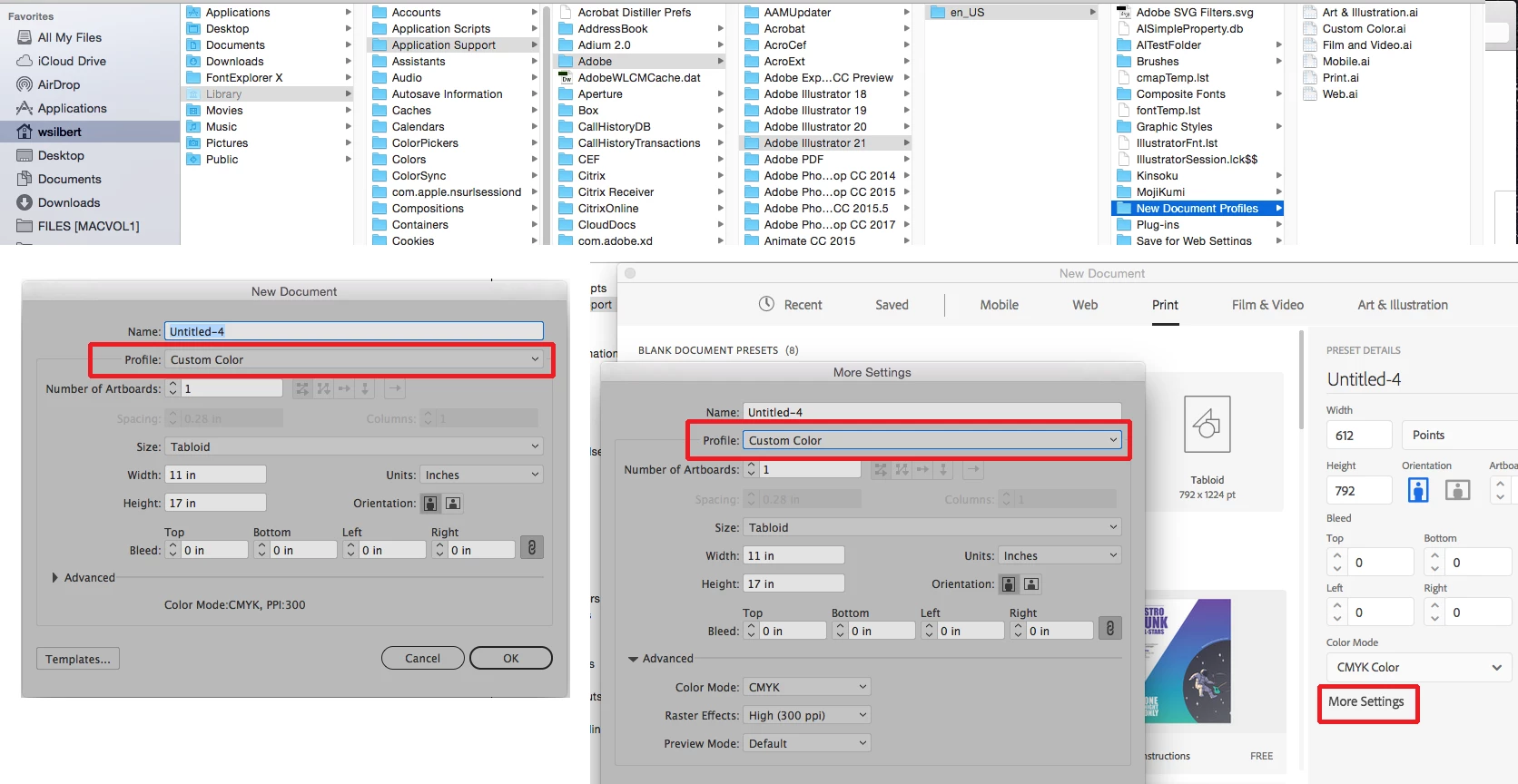
    On a Mac open a finder window in column view and with the option key pressed go under the Finder Go menu to show Library and then follow the path shown in the top picture above. Place the file you created and saved to the desktop into the New Document Profile folder (highlighted in blue above). On a PC use the path {drive}\Documents and Settings\{user}\Application Data\Adobe\Adobe Illustrator (#) Settings\{lang}\New Document Profiles. Then when you create a new document you will choose this new profile in the New Document Dialog window. If you’re using the legacy dialog window then it will be in the “Profile:” pull-down menu as seen in the bottom left picture. If using the new-fangled New Document dialog click on “More Settings” and choose the profile as shown in the bottom right picture.

    2 replies

    Bill Silbert
    Community Expert
    Bill SilbertCommunity ExpertCorrect answer
    Community Expert
    September 28, 2017

    You can create a New Document Profile. Start by creating a new document and setting up the swatch panel with only the colors that you will want for creating future documents. Save the document to your desktop.

    On a Mac open a finder window in column view and with the option key pressed go under the Finder Go menu to show Library and then follow the path shown in the top picture above. Place the file you created and saved to the desktop into the New Document Profile folder (highlighted in blue above). On a PC use the path {drive}\Documents and Settings\{user}\Application Data\Adobe\Adobe Illustrator (#) Settings\{lang}\New Document Profiles. Then when you create a new document you will choose this new profile in the New Document Dialog window. If you’re using the legacy dialog window then it will be in the “Profile:” pull-down menu as seen in the bottom left picture. If using the new-fangled New Document dialog click on “More Settings” and choose the profile as shown in the bottom right picture.

    Monika Gause
    Community Expert
    Community Expert
    September 28, 2017

    For new files: Startup Profiles – A Great tool to Customize your New Documents « Adobe Illustrator blog

    Or are you loooking to do that on existing files?

    fabiank14828111
    Participant
    September 29, 2017

    Do you know how to add color swatches to existing files?

    For example, when I download icons, there are no colors in the SVG document.

    Monika Gause
    Community Expert
    Community Expert
    September 29, 2017

    Open the swatches panel.

    In the panel menu you find a function that automatically adds used colors.

    If there are no colors used in the document you will have to load swatches (or create them)

    If you don't want swatches, use the color panel.