
Participant
March 26, 2021
Answered

Sample Color Outside Illustrator

  • March 26, 2021
  • 2 replies
  • 485 views

Hi,

I am trying to sample a color outside of Illustrator with the eyedropper tool and I can't seem to get it to pick up anything. I clicked and dragged the eyedropper from illustrator and I see the tool appear on my web browser, but all it comes up with is black. Any ideas on what I might be missing?

Thanks!
This topic has been closed for replies.
Correct answer kphotopage

Elaine, Hi.


I could not Eyedropper color outside either. It once worked!!!!

All I got was the blue color of my screen.


Hmm…….

I got a new computer last year.

Mac OS Catalina

Version 10.15.6

I did a fresh install of Adobe 2020


What I did today was to go to

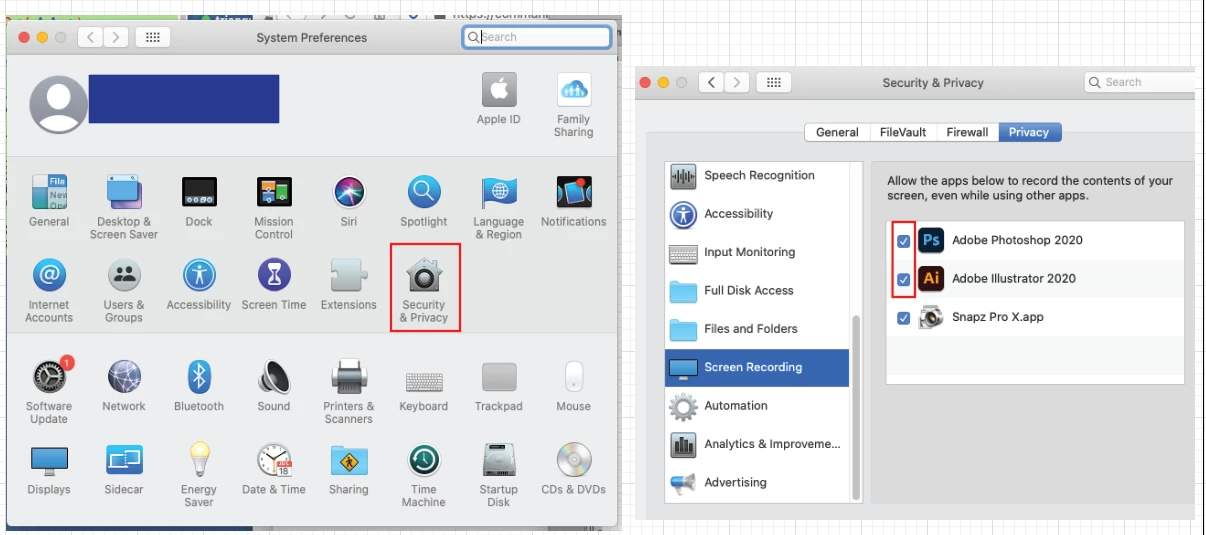
System Preferences>Security & Privacy>Screen Recording, Then checked Photoshop and Illustrator.

Then restarted Illustrator.


Now I can eyedropper outside of Illustrator. 😀 😀

I simply selected the Eyedropper Tool, clicked and dragged to the image I wanted to sample.


K

2 replies

kphotopage
kphotopageCorrect answer
Legend
March 26, 2021

Elaine, Hi.


I could not Eyedropper color outside either. It once worked!!!!

All I got was the blue color of my screen.


Hmm…….

I got a new computer last year.

Mac OS Catalina

Version 10.15.6

I did a fresh install of Adobe 2020


What I did today was to go to

System Preferences>Security & Privacy>Screen Recording, Then checked Photoshop and Illustrator.

Then restarted Illustrator.


Now I can eyedropper outside of Illustrator. 😀 😀

I simply selected the Eyedropper Tool, clicked and dragged to the image I wanted to sample.


K

Ton Frederiks
Community Expert
Community Expert
March 26, 2021

Try to hold down the Shift, then drag to a window outside Illustrator to fill a selected object.