
michelleh80670627
Participant
October 15, 2018
Answered

Save as dialog resize

  • October 15, 2018
  • 2 replies
  • 753 views

Several years ago we lost the ability to (permanently) change the size of the save as dialog box. It was finally fixed, but the issue reappeared in 2018 and was never addressed. I was hoping it would be fixed in the 2019 release, but that doesn't appear to be the case. Is this issue ever going to be fixed??
    This topic has been closed for replies.
    Correct answer Jeff Witchel, ACI

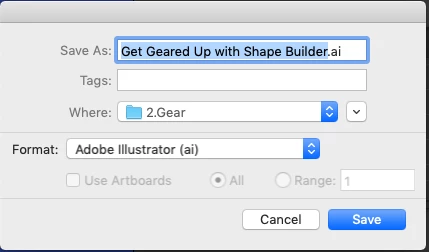
    If your dialog window looks like the following screenshot, you can't resize.

    To resize, click the down arrow to the right of "Where" popup menu. In this expanded view you can resize the window.

    2 replies

    Jeff Witchel, ACI
    Community Expert
    Jeff Witchel, ACICommunity ExpertCorrect answer
    Community Expert
    November 26, 2018

    If your dialog window looks like the following screenshot, you can't resize.

    To resize, click the down arrow to the right of "Where" popup menu. In this expanded view you can resize the window.

    Srishti_Bali
    Legend
    October 16, 2018

    Hi Michelle,

    I am using Windows 10 and in both CC2018 and CC2019, I can resize the "Save As " dialog box. Could you please confirm which Operating System(Exact version of Windows/ MAC) are you using?

    Regards,

    Srishti

    michelleh80670627
    Participant
    November 26, 2018

    I’m on a Mac – OS Mojave 10.14.1.

    Thank you,

    Michelle Hoffman