techillus200717
Participant
May 25, 2017
Question

Save down to CS5 from CC 2017 loses layers

  • May 25, 2017
  • 2 replies
  • 1912 views

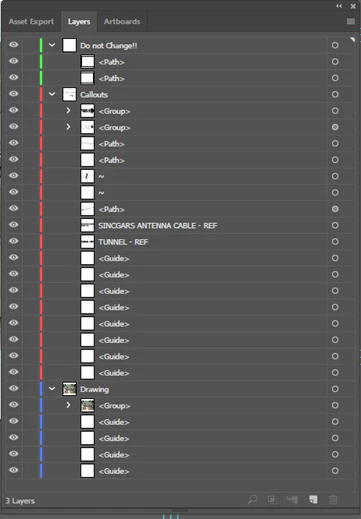
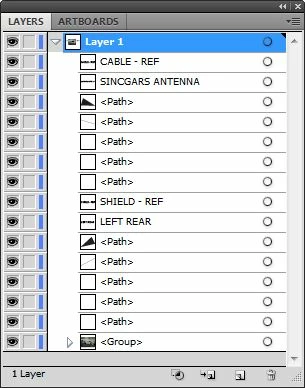
I have the latest version of Illustrator, CC 2017, but not everyone at my job does, so it is necessary to save down to the lowest version in use so everyone can access it. In our case, it's version CS5. When these users open the files, all the layers are compressed and any graphic styles applied are expanded. Curiously, this only happens if the files are saved in the native AI format. I can save them in EPS without seeing these issues, but the EPS is nearly twice as large and we already have issues with drive space. Please patch this soon! Examples of layers before and after are below: CC 2017 on the left; file opened in CS5 on the right.
    This topic has been closed for replies.

    2 replies

    VoltisArt
    Participant
    May 26, 2017

    New or fancy effects sound very reasonable to not be able to translate into an older version.  That being said, "some editing features" should not include ancient basics such as layers.  It's absurd that Adobe accepted (or chose...not that marketing ever limits feature sets...) this limitation for saving to any version starting with a C.

    Even if the code per version is different, why can't the current program include proper coding for saving?  That particular part of the program shouldn't be a significant part of program file size.  If it is, maybe Adobe would make a lot of people happy by making read/export/save versions optional, modular features.

    Om Nath Jha
    Legend
    May 25, 2017

    Hi techillus,

    That could be possible as down-saving your AI file certainly has some limitations. When you save a file from CC 2017 as CS5 file, you get a warning at the bottom which explains this as well. Please check the screenshot:

    Hope this answer your concern.

    Regards,

    Om

    techillus200717
    Participant
    May 25, 2017

    I know, I've seen the warning before, but I've never actually had a problem until I was upgraded to CC. None of the appearance attributes were hidden as far as I can tell. We do lock layers as a rule, but I did some tests with the layers unlocked (as well as a few other things) and still had issues. Even curiouser, one user has Illustrator version 15.0 and another has 15.0.3, and the one with 15.0.3 has more issues with the downsaving than the user with the older build. That is why I think it's a bug.

    Monika Gause
    Community Expert
    Community Expert
    May 25, 2017

    Which appearances exactly do you lose?

    Some effects, brushes, other options simply can't be kept as these functions don't exist in Illustrator CS5.