
This topic has been closed for replies.
Correct answer AshutoshChaturvedi

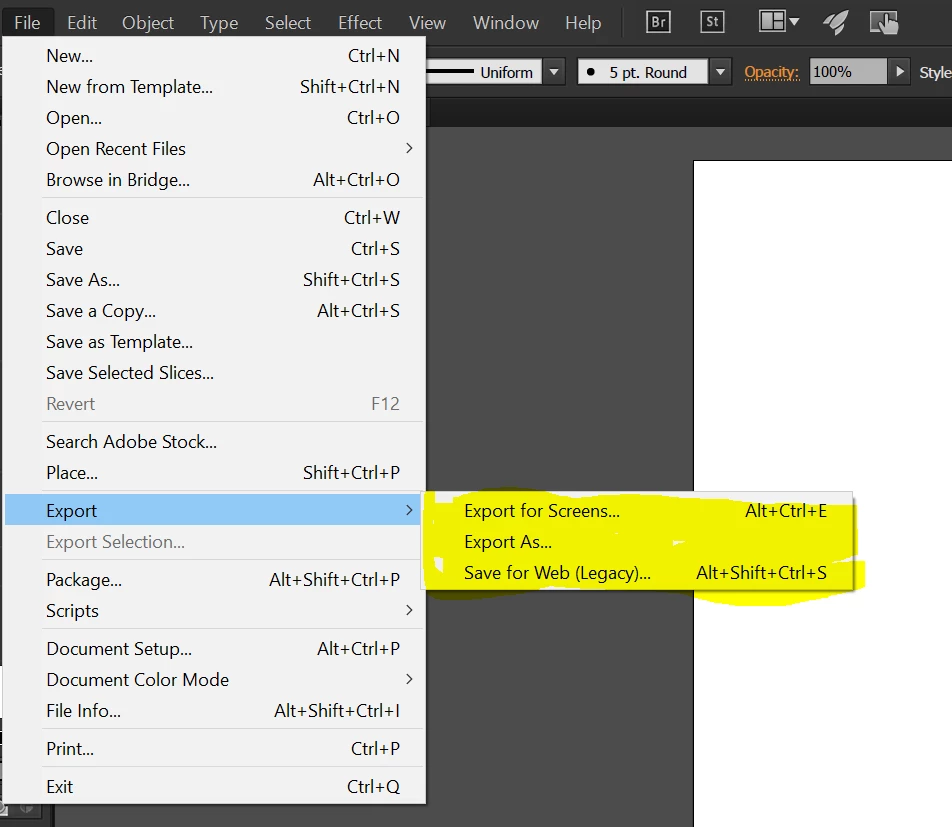
S4W has now a new home inside the export menu. Please see the snapshot.

We have also added a new export route. Please try the new fast export feature and let us know how you feel about it.
17 replies

August 19, 2016

The Save for Web bug where it forgets your previously used settings and always defaults back to GIF has been fixed in the 2015.3.1 update. Yes!!!!

Now when I set Save for Web to PNG transparent, it always opens as PNG transparent! Hurrah! Well done Adobe for responding and fixing this bug quickly.

Known Participant
July 25, 2024

Perhaps I'm missing something, but it's now July of 2024 and Save for Web only remebers your save location the second time you use the file. It used to remember the last directory where a file was saved, a much better option.
Screens is okay, but clunky, slow, and not suited to most folks needs.

Monika Gause
Community Expert
Community Expert
July 25, 2024

Are you using version CC2015 or which version is your comment about?

kevinh7297008
Participant
August 19, 2016

I agree with most everyone else.  This option is much inferior to save for web.  I don's see a way to turn transparency on or off as I could with the old.  Please bring save for web back. 

August 19, 2016

In Export for Screens, for Transparency:  Look for the cogwheel above the Formats box (next to where it says iOS and Android). In these settings you can turn transparency on/off.

Participating Frequently
August 4, 2016

I like one feature of Export for screens: the ability to export multiple artboards at once.

That said, it's clunky, limits the export options, and the files it creates are not compressed well.

A jpeg 80 from export from screens is larger than a jpeg 80 in save for web. I'd just ignore it and do things the way I always have, but as other mentioned Save for Web no longer remembers the export setting and defaults to GIF.

Give us save for web with the ability to export multiple artboards.

Participating Frequently
August 4, 2016

One more note: the export for screens jpeg settings all default to CMYK (that explains the larger file size). What screen uses CMYK? And trying to save over the preset doesn't work.

Ok now I've moved from sightly annoyed to angry. This coupled with the save for web not saving settings is going to add a lot of time to my workflow.

blanding3
Participant
July 30, 2016

AND IT CRASHES!!!!!!

Really Adobe Come on This SUCKS big time!!!!  am having hrs of issues because of this from the time of my last post til now I have crashed 6 times, found odd things on my image that is not in the org pic and have no idea how to remove, slow not recalling setting the list can go on on on and when I tried to save using that new little ditty you dropped in "the new and improved button" to save to web I crashed yet again!

My pc has enough power,ram CPU space etc to fly like a jet  if I hit the right button due to the fact that Adobe illustrator the program I am in 23hrs of a 24hr day commands it and yet this happens due to your update just flip it back it was not perfect seems it never is oddly enough but it worked with less frustration and a want or desire to find a new design program not Adobe related or owned or tinkered with by Adobe tech folks or as I call them "THE POWERS THAT BE"

IT SUCKS SUCKS SUCKS wow I hate it 1Million % can you tell I hate it SUCKS!!!!!

blanding3
Participant
July 30, 2016

!

AND IT CRASHES!!!!!!

Really Adobe Come on This SUCKS big time!!!!  am having hrs of issues because of this from the time of my last post til now I have crashed 6 times, found odd things on my image that is not in the org pic and have no idea how to remove, slow not recalling setting the list can go on on on and when I tried to save using that new little ditty you dropped in "the new and improved button" to save to web I crashed yet again!

My pc has enough power,ram CPU space etc to fly like a jet  if I hit the right button due to the fact that Adobe illustrator the program I am in 23hrs of a 24hr day commands it and yet this happens due to your update just flip it back it was not perfect seems it never is oddly enough but it worked with less frustration and a want or desire to find a new design program not Adobe related or owned or tinkered with by Adobe tech folks or as I call them "THE POWERS THAT BE"

IT SUCKS SUCKS SUCKS wow I hate it 1Million % can you tell I hate it SUCKS!!!!!

knilch-lGktan
Participant
July 30, 2016

Agree with those who would like to keep "Save for Web" and yes, it should again remember the personal settings (e.g. PNG). I finally understood the way to work with the "Export for screen" dialog, but excluding other artwork from the export by just hiding it (which worked fine in Save for Web) does not work. The preview shows the expected result but the export always renders also hidden layers/assets. Maybe this is a bug? If not it is misleading and (as stated before) of little help to just see a thumbnail of the current artboard state.

Placing assets on different artboards and using the artboard name as export file name is not feasable, especially in situations where you use an Illustrator file to keep all icons in a project collected (which can be dozens or hundrets).

Also, while I do appreciate the new scaling option (x1, x2 ... which comes in handy for DPI dependent work, e.g. iOS screens) often one may just as well add more detail to an illustration as more pixels become available and thus exporting in different scales is not relevant. So merging the two concepts (Save for web and Export for screen) would actually be good. At least export for screens needs an option to specify the filename independent of the artboard name(s) and preview should be as it has been in Save for web and match the result of the output..

Participant
July 29, 2016

Yes please add me to the list of people who would like Save For Web to remember my previous settings like it used to.

Participant
July 26, 2016

Add me to the list of people who find this update irritating and pointless. S4W was working fine, there was no need to adjust it. I don't recall many people having a problem with this function at all, prior to this software  update.

Participant
July 20, 2016

This is a sad update, indeed. Nothing like changing a creative group's workflow without asking their opinion on the issue first. Or, at bare minimum, giving us a way to revert back to the "Save for Web" functionality that many of us rely on without having to learn a new 3+ finger kb shortcut and change from GIF to an actually popular format - or better yet, the format we used the last time.

Hmmm ... sounds like common sense to me, but then again, I don't get paid the big bucks to mess with a passionately used creative tool's user experience.

smh​ saveforweb​ userexperience​ uiuxfail​

Participant
July 19, 2016

Shame!
Please don't let product managers, that don't know jack about Illustrator, make such harmful changes.
