Participant
Jun 27, 2019 8:20 AM UTC
Answered

Save glowing vectors to a PNG with a transparent background

Hi,

I have an .eps vector file with glowing sparks,

for some reason, which I have encountered many times before, the glowing vectors always have

black background, so you can't really save them as a transparent PNG image.

I was wondering if you can tell me if I'm doing something wrong, or how,

if it's even possible, can I export it as a transparent image?

An example of my vector file:
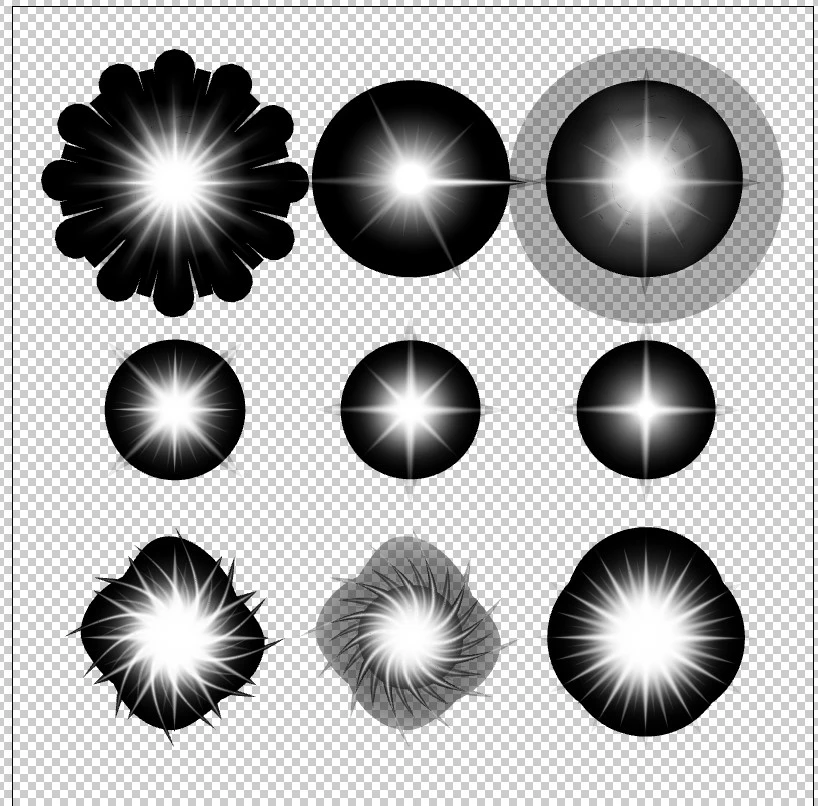
Thanks.

This topic is closed to new replies. Start a new post to keep the conversation going.
Monika Gause
Monika GauseCorrect answer
Community Expert
Nov 12, 2024 7:01 PM UTC


If it's not possible, how was this transparent png done?


It has just been painted in that color. 

But the files being discussed in this thread have been approached differently. 

If you want to start from scratch, you can totally do the second aproach, but you cannot switch approaches in the middle of a project. 

10 replies

rcraighead
Legend
Jun 27, 2019 12:48 PM UTC

Here's a video showing the process Monika has described.

Translate
yakirbuAuthor
Participant
Jun 27, 2019 1:15 PM UTC

Awesome! Thanks.

Translate
Monika Gause
Community Expert
Community Expert
Jun 27, 2019 8:40 AM UTC

Put a black background behind them and save that as any raster format, high resolution.

Then open in Photoshop and use it as an alpha channel:

1. Load the channel as a mask

2. Fill with white on a transparent layer

3. Export as PNG

Translate
Grant H
Community Expert
Community Expert
Jun 27, 2019 8:37 AM UTC

EPS does not support transparency... an ai EPS is a combination of an EPS and AI file (if that makes sense) so you would need to modify the objects first in AI and save as an AI file.

/G

Translate