

MahaB82A
September 29, 2025
Answered

Saving Custom Shortcut Key

  • September 29, 2025
  • 2 replies
  • 536 views

What are the circumstances Ai loose it's custom shortcut keys. I assigned shortcut keys but it is frequently  lost. I saved it in a external file but couldn't find a path to replace it. How to fix it?


Correct answer Abhishek Rao

Hi @MahaB82A,


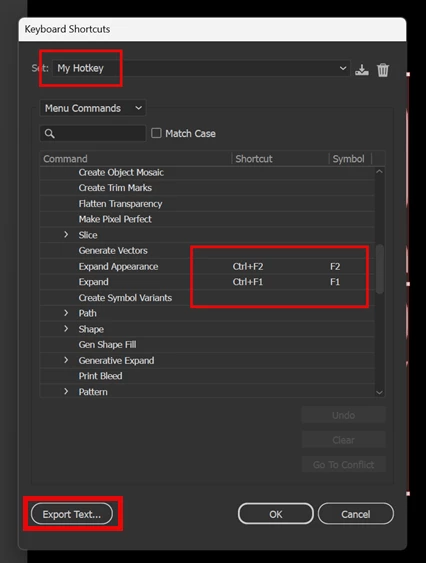
Every time you create a new keyboard shortcut set in Illustrator, a .kys file is generated and stored in this location on Windows: C:\Users<Your Username>\AppData\Roaming\Adobe\Adobe Illustrator <version> Settings\en_US\x64. For reference, I've attached screenshots of my own custom keyboard set in Illustrator and its respective .kys file location. You can copy your .kys file to a backup location and if Illustrator preferences lose it, you can simply paste your backed up .kys file back into the x64 Illustrator preferences folder and restart Illustrator. Your custom shortcuts should then reflect back in the app.


Looking forward to hearing how it goes for you.

Abhishek

2 replies

Abhishek Rao
Community Manager
Community Manager
September 29, 2025

Hi @MahaB82A,


Thanks for reaching out. Illustrator can sometimes lose custom shortcuts if the preferences reset after an update or crash, or if the shortcut set was not saved with a unique name. When you create your shortcuts, make sure you save the set with a new name instead of keeping it as the default. This way Illustrator stores it as a separate file, and it won't get overwritten. The Export Text option only creates a reference list and unfortunately can't be imported back, so the best way to preserve your setup is to save the shortcut set with a custom name and then back up the .kys file from the Illustrator preferences folder(macOS: ~/Library/Preferences/Adobe Illustrator <version> Settings/<locale>/Adobe Illustrator Prefs; Windows: C:\Users\<username>\AppData\Roaming\Adobe\Adobe Illustrator <version> Settings\<locale>\x64\Adobe Illustrator Prefs). If it gets lost again, you can drop the .kys file back into the same folder to restore it.


Could you try saving your set with a unique name and let me know if it still resets after that?

Abhishek

MahaB82A
MahaB82AAuthor
September 29, 2025

Adobe Illustrator Prefs is not a folder to save. Export Text saved custom hotkey as  *.txt file externaly. I assume I have to place copy of  this file inside a appropriate folder to retain my hotket settings.


CarlosCanto
Community Expert
Community Expert
September 30, 2025

no, that's not the correct procedure.


as @Abhishek Rao explained, the Export Text can not be imported back into illustrator, it's only a reference for you to look at. I use it to see what keys are not used.


if you create new shortcut keys, re start illustrator to save your custom shortcuts. If you don't close illustrator and it crashes the new shortcuts won't get saved.

Ares Hovhannesyan
Community Expert
Community Expert
September 29, 2025

May be resetting preferences can help or uninstall program without keeping preferences. Than install it again.

