


Aug 28, 2013 4:00 PM UTC
Answered

Saving illustrator PDF seems to change the colours

Hi Guys,

I'm not sure if you can help at all - but for some inane reason, when I save the PDF the colours and blending modes seem to completely change.

Please see below.
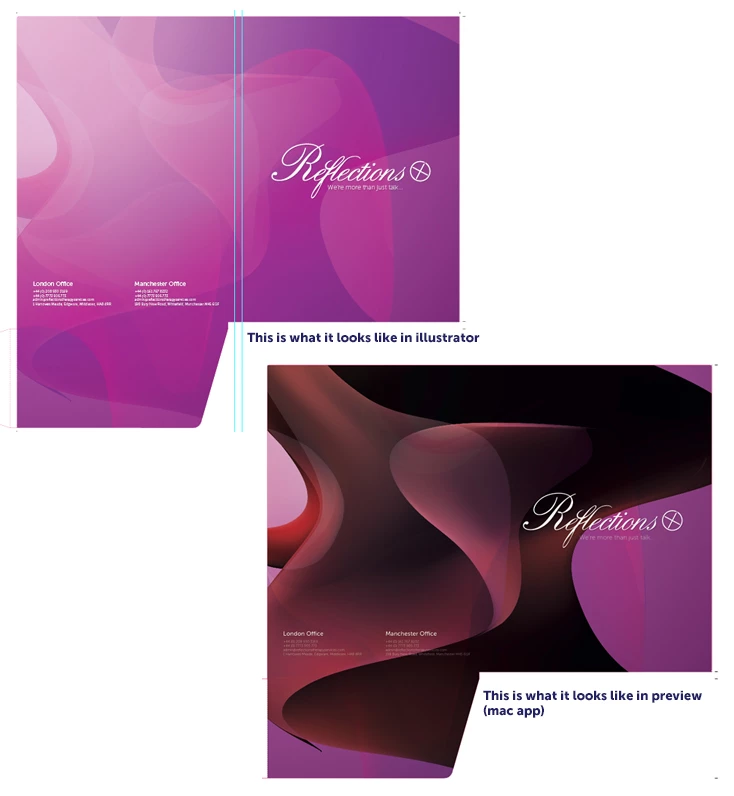
Any help would be so greatly appreciated!

emil emilCorrect answer
Inspiring
Aug 28, 2013 4:16 PM UTC

I don't use a mac, but from the note on your screenshot I guess it could be that Mac app preview problem only. What other software you have tried?

26 replies

Participant
Jan 19, 2023 5:41 AM UTC

Hey there, I was facing the same problem, here's what worked out for me:

File > Save As > Adobe PDF > Output > Profile Inclusion Policy > Here I selected "Include All Profiles" and it worked like a charm! I have also attached a screenshot, hope that helps 🙂

Translate
Participant
Feb 21, 2024 12:37 PM UTC

Oh, Finally. You got the answer! Appreciate!

[abuse removed by moderator]

Translate
Participant
Mar 1, 2022 6:53 PM UTC

Hello, this solution may have some relevance to this issue. I too found this thread because my PDF export colors were not matching the colors of me AI document. The solution that I found was that the print document was accidentally in RGB when it should had been in CMYK. Converting the document to CMYK fixed this issue. Note: My PDF export was under the "High Quality Print" setting which may have also caused the issue. Hopefully this helps and/or guides you towards finding your solution! 


In response to the "Correct Answer", While working on a Mac, I viewed this issue in both Preview and Acrobat. May not be a mac exclusive issue although I have had issues with Preview showing innacurate artwork in the past. 

Translate
Participant
Jul 28, 2022 10:11 PM UTC

I was having the same issue, with the colors changing when exporting a PDF from adobe illustrator. The solution that worked for me was opening the raw .ai file in preview, then using preview to export the PDF. Colors in the PDF matched the original .AI document then. 

Translate
Monika Gause
Community Expert
Community Expert
Jul 28, 2022 11:01 PM UTC

Using Preview to get the colors right is never a solution.

Preview is good when you want to check if there is something in your PDF at all.


In order to get color right, you have to set up and use color management correctly and there's no shortcut to that.

Translate
Participant
Jan 31, 2019 1:23 AM UTC

Hi,

I'm having the same issues and saving for web or changing the destination colours. This is driving me crazy. How do I make sure the colours don't change from the 1st picture when exporting my PDF?  It keeps changing on me to the coloured version below.


Thank you,

Alex

Translate
Monika Gause
Community Expert
Community Expert
Jan 31, 2019 11:16 AM UTC

Nobody can see into your computer.

Please post some relevant information.

WHich version of Illustrator is this?

What exactly is in the file? Is there a white rectangle in the background? And what exactly is applied to it? Check the appearance panel and inspect all your objects

Is your document in RGB or CMYK?

How is color management set up?

How exactly are you exporting your file? Which settings?

Translate
Participating Frequently
Aug 17, 2015 1:34 AM UTC

When I opened illustrator file in Acrobat - the color I used was still changed. Realized that in one of my gradations I was using a spot color and that was what was changing when saved as PDF. I changed it to CMYK and all better.

Translate
Participating Frequently
Jun 15, 2021 2:49 AM UTC

It happens to embeded images I place on my illustrator artboards as well. Extremely frustrating considering I'm trying to make a portfolio showcasing my work. I can't manipulate the CMYK color settings since they are images. 

Translate
Ton Frederiks
Community Expert
Community Expert
Jun 15, 2021 7:05 AM UTC

Rebekah, can you start a new post, this one started in 2013.

And give some more details about document color mode, color settings and settings for saving as PDF.

Translate
emil emilCorrect answer
Inspiring
Aug 28, 2013 4:16 PM UTC

I don't use a mac, but from the note on your screenshot I guess it could be that Mac app preview problem only. What other software you have tried?

Translate
Aug 28, 2013 7:38 PM UTC

Actually, you're correct. I've just opened it up in adobe acrobat, and it's showing fine. I wonder why the preview app shows it differently then?

Translate
Larry G. Schneider
Community Expert
Community Expert
Aug 28, 2013 7:53 PM UTC

Because Preview uses an older subset of the PDF specs.

Translate
Mike_Gondek10189183
Community Expert
Community Expert
Aug 28, 2013 4:10 PM UTC

I am sure we can help you with this. What pdf setting did you use, smallest file size?

Set color to "No Conversion", this will keep in cmyk and not go to RGB.

If this does not help, let us know about  your blending modes, and also make sure overprint preview in on in Illustrator, and in acrobat. Not sure what preview does with overprints.

Translate
Aug 28, 2013 5:56 PM UTC

Hi Mike, thanks for the help but unfortunately that didn't work. It's really strange. When I save for web, the correct colours come up - it just doesn't seem to get the correct colours when I save to PDF and it's driving me nuts!

Any other ideas? All help is appreciated.

Thanks.

Translate
Inspiring
Aug 28, 2013 6:07 PM UTC

zo0tboy wrote:

...

Any other ideas? All help is appreciated.

Thanks.

did you pay any attention to my input

Translate