



Participant
January 8, 2026
Answered

Saving .pdf as Linked File & Reopening as Linked File

  • January 8, 2026
  • 2 replies
  • 104 views

I need to be able to send my vectorized .pdf file to clients.  I want them to be able to have a vectorized file (since the quality is so clear), but not be able to open the document in Adobe Illustrator and be able to see all my paths, layers, etc. Recently I opened another company's .pdf (that was emailed to me) in adobe illustrator to see if I could edit it, and noticed it was a Linked File. I am trying to save my own file as a Linked File, and it is not working.  When I reopen the document in Illustrator, my work is embedded, and once again my paths are able to be seen. 

        These are my steps: 

              1. File/Save As/.pdf /.everything unclicked/Save PDF
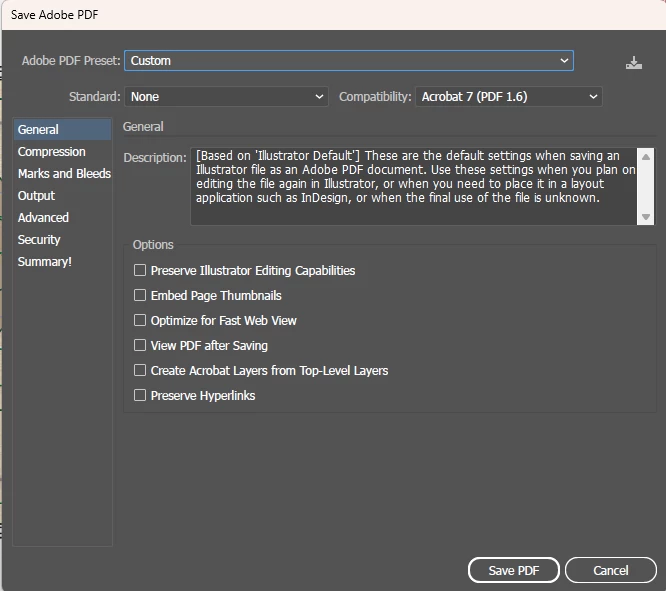
                Catie5EC9_0-1767896596391.png     

             2. File/New Document/Create/File/Place/click on previously saved .pdf/check the 'Link' box/

                 Place. As you can see, it is a Linked File   
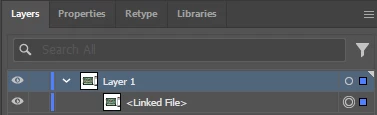
                   Catie5EC9_1-1767896790911.png

             3. File/Save As/new.pdf/save/uncheck everything/Save PDF

             4. Open the saved .pdf in Adobe and now it is embedded 
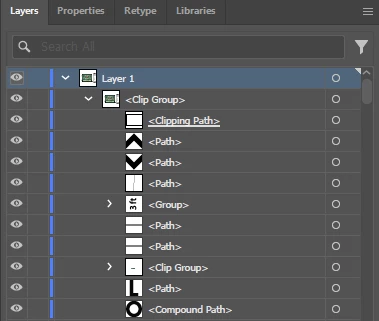
             Catie5EC9_2-1767896993185.png


Correct answer Bobby Henderson

There isn't any good way to create a PDF that contains vector graphics that can be viewed but not extracted in an app like Adobe Illustrator. PDF files can be password protected at the edit level to block apps like Illustrator from opening them directly. Unfortunately that kind of password protection can be broken fairly easily. A PDF that is password protected at the file>open level is far more secure, but the person viewing the PDF has to know the password in order to open the document. Once they have the password they can enter that when dropping the PDF into Adobe Illustrator.


Using linked files isn't much of a solution either. Such an approach would only (sort of) work if an Adobe Illustrator .AI file with PDF compatibility intact was shared. If the client could drop the .AI file into Adobe Reader and still see the linked graphics the client would probably really be viewing an embedded copy of those graphics. The client might be able to place the .AI file into a new document and use the flatten transparency trick to grab the vectors in the PDF portion of the file.


If you're really concerned about the security of your artwork I think the only reliable approach is rasterizing the vector graphics and maybe even baking a pattern or watermarks into it as well. That would "ruin" the content enough where a client wouldn't be able to simply re-use it. You can adjust the resolution of the rasterized results to balance image quality vs being email friendly.

2 replies

Tina_Irvine
Community Expert
Community Expert
January 9, 2026

In addition to @Bobby Henderson's suggestions, to save your vector as a linked file, you can bring your vector image into Photoshop and save it as a PDF (make sure "layers" is deselected). It'll end up as a raster, but you can always make sure it's high resolution / large enough so that any prints they might need come out sharp. Aside from flattening your image in Illustrator, this is the best way to make sure editing isn't easily accessible.

Bobby HendersonCommunity ExpertCorrect answer
Community Expert
January 8, 2026

There isn't any good way to create a PDF that contains vector graphics that can be viewed but not extracted in an app like Adobe Illustrator. PDF files can be password protected at the edit level to block apps like Illustrator from opening them directly. Unfortunately that kind of password protection can be broken fairly easily. A PDF that is password protected at the file>open level is far more secure, but the person viewing the PDF has to know the password in order to open the document. Once they have the password they can enter that when dropping the PDF into Adobe Illustrator.


Using linked files isn't much of a solution either. Such an approach would only (sort of) work if an Adobe Illustrator .AI file with PDF compatibility intact was shared. If the client could drop the .AI file into Adobe Reader and still see the linked graphics the client would probably really be viewing an embedded copy of those graphics. The client might be able to place the .AI file into a new document and use the flatten transparency trick to grab the vectors in the PDF portion of the file.


If you're really concerned about the security of your artwork I think the only reliable approach is rasterizing the vector graphics and maybe even baking a pattern or watermarks into it as well. That would "ruin" the content enough where a client wouldn't be able to simply re-use it. You can adjust the resolution of the rasterized results to balance image quality vs being email friendly.