Participant
June 12, 2012
Answered

Saving Sliced files in Illustrator CS6 like it was in CS5 "Save for web and devices" gone?

  • June 12, 2012
  • 4 replies
  • 22616 views

Hello,

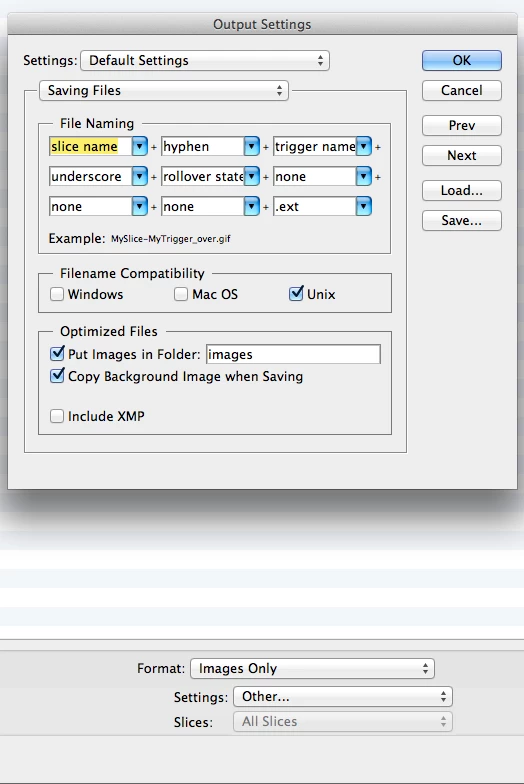
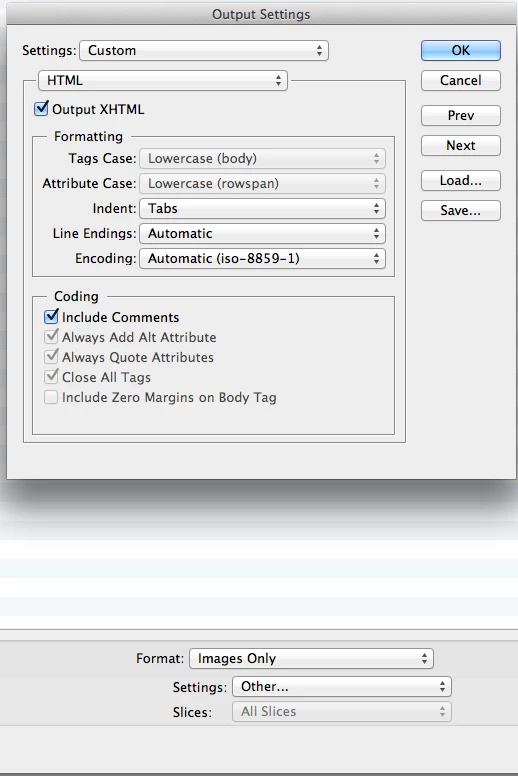
I used to save all my slices in CS5 and it would give me the option to save for web and devices, then when I was in there it would let me choose the option at the bottom Other... then I could go in and save it as a html and images and then it would automatically make div's for me when I brought it in to dreamweaver.  Where did this option go in CS6?  Can someone help I am on a big deadline, and I lost all my work transfering it back into cs5 to try it there like I used to.  Attached is a .png to show what I mean.

Thank you,

DariusB
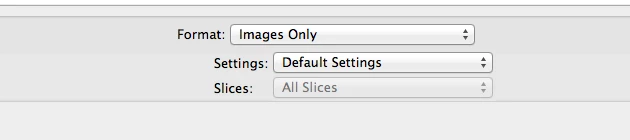
These options are not here in CS6 and I cant find it.  I would really appreciate the help.

Thanks again.

    This topic has been closed for replies.
    Correct answer mikemcfad

    Here's how.

    Once in the "Save for Web" dialogue box. Click the Preview button and the HTML page will be generated and opened in your default browser.

    Below the preview of the design / layout will be the HTML code for you to copy and paste into a blank HTML page in Dreamweaver.

    4 replies

    Participant
    February 22, 2014

    This thread may be too old for it to matter but, for anyone who needs it, I was able to Export my AI file to a CSS file then open it in DreamWeaver.

    akk59868777
    Participant
    February 15, 2015

    if you can, please say how

    Monika Gause
    Community Expert
    Community Expert
    February 15, 2015

    It's not too difficult to find out:

    Illustrator Help | Extract CSS | Illustrator CC

    Community Manager
    July 10, 2012

    Hi,

    There have been some other changes too - here is the link to the article that describes the changes: http://blogs.adobe.com/ivandavid/illustrator_cs6_save_for_web/.

    Cheers,

    David

    mikemcfadCorrect answer
    Inspiring
    June 18, 2012

    Here's how.

    Once in the "Save for Web" dialogue box. Click the Preview button and the HTML page will be generated and opened in your default browser.

    Below the preview of the design / layout will be the HTML code for you to copy and paste into a blank HTML page in Dreamweaver.

    Participant
    July 10, 2012

    Thanks Mikemcfad for posting this for others.  If wade didnt send me private messages telling me I am a $#$%&^ I would have posted the same thing.  So thank you very much.

    Inspiring
    June 12, 2012

    Illustrator C S 6 does not generate html as with older versions, that is why the oprions are gone.

    Participant
    June 12, 2012

    Hence my original question.  Im asking if there are any other ways in doing this with the slicing in illustrator so it creats the output Xhtml.  There is no way they would take it out without implimenting another way to do it.

    Inspiring
    June 12, 2012

    I was pretty clear it is no longer a part of Illustrator, Export your slices as images and make your divisions in DW.

    Or bring it into Photoshop as a smart object and save for the web and select images and html or open in Fireworks and do the same.